⭐⭐⭐⭐⭐ Trusted by Businesses Across India
Simplify Employee Attendance with One Intelligent Attendance Management System
Managing employee attendance manually through paper registers, spreadsheets, or disconnected devices is no longer practical for modern organizations. As businesses expand across multiple locations, support remote work, and operate in multiple shifts, accurate attendance tracking becomes increasingly difficult.
An Attendance Management System eliminates these challenges by automating attendance capture, calculating working hours, monitoring employee punctuality, tracking overtime, managing shifts, and synchronizing attendance data with payroll—all from a centralized platform.
Whether you manage a manufacturing unit, hospital, retail chain, IT company, educational institution, logistics business, or construction project, an intelligent attendance solution helps improve workforce discipline, reduce administrative work, and increase operational efficiency.
Quick Answer: Attendance Management Systems
An Attendance Management System is a digital solution that records, tracks, and manages employee working hours, attendance, shifts, overtime, holidays, and leave through automated technologies such as biometric devices, facial recognition, GPS tracking, mobile applications, QR codes, RFID cards, and web clock-ins.
Instead of relying on manual registers or spreadsheets, organizations can monitor employee attendance in real time, reduce payroll errors, improve productivity, and gain complete visibility into workforce availability.
Best Suited For
Recommended Solution: Megamind Technosoft Attendance Management System
Cloud-based and on-premise deployment options with biometric, face recognition, GPS, QR code, and RFID attendance integration.
In This Complete Guide
By the end of this guide, you'll learn:
- What an Attendance Management System is
- Why attendance automation is essential for modern businesses
- How attendance software works
- Core features every business should look for
- Different attendance tracking methods
- Cloud vs On-Premise attendance software
- Payroll and attendance integration
- Pricing and ROI considerations
- Industry-specific use cases
- How to choose the right attendance software
- Common buying mistakes to avoid
- Frequently asked questions
Why Modern Businesses Are Moving to Digital Attendance Management
Employee attendance is no longer just about recording "present" or "absent." Today, businesses need accurate workforce data to manage payroll, ensure compliance, optimize productivity, and improve employee accountability.
Traditional attendance methods often create challenges such as:
- Manual attendance errors
- Buddy punching
- Proxy attendance
- Delayed payroll processing
- Incorrect overtime calculations
- Shift scheduling conflicts
- Difficult attendance reporting
- Compliance issues
- Time theft
- Poor workforce visibility
As organizations grow, these problems become more expensive and time-consuming. A digital Attendance Management System solves these issues by capturing attendance automatically, enforcing attendance policies, and providing real-time workforce insights.
What is an Attendance Management System?
An Attendance Management System is a centralized software platform designed to monitor and manage employee attendance throughout the organization. It captures attendance data through multiple technologies, processes working hours according to company policies, and generates accurate attendance records for payroll, compliance, and workforce management.
Unlike manual attendance registers or Excel sheets, modern attendance systems offer real-time tracking, automated calculations, configurable attendance rules, and detailed reporting.
An advanced attendance platform can seamlessly integrate with payroll, leave management, employee self-service (ESS), HRMS, and biometric devices, ensuring a single source of truth for workforce attendance.
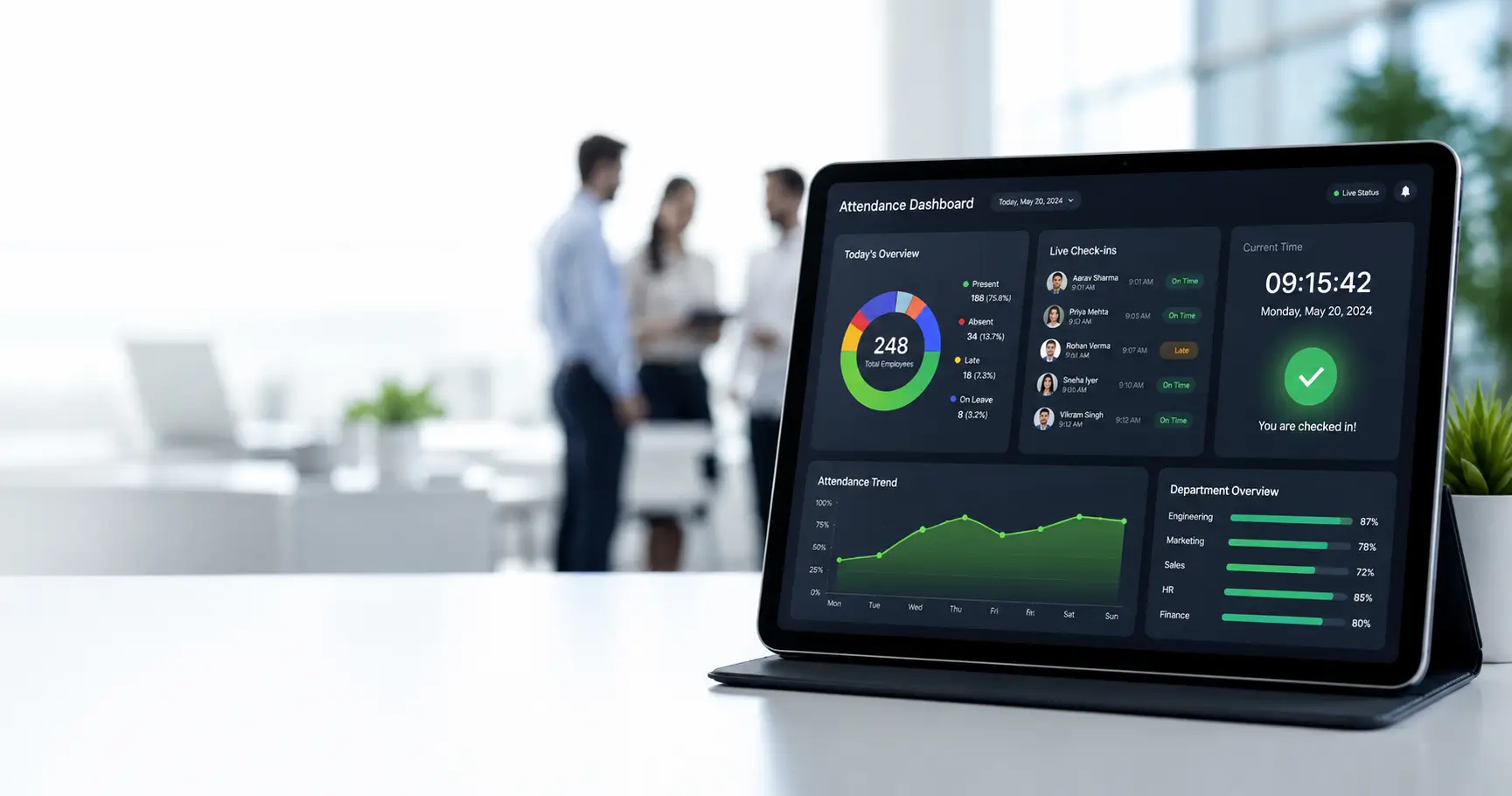
Modern Biometric Attendance Management System Dashboard
How Does an Attendance Management System Work?
A modern Attendance Management System follows a streamlined workflow that eliminates manual intervention while improving data accuracy.
Employee Registration
Employee details, departments, shifts, work locations, and attendance policies are configured in the system.
Attendance Capture
Employees record attendance using one or more approved methods such as biometric fingerprint devices, face recognition terminals, GPS-enabled mobile app, QR code scanning, RFID or smart cards, or web clock-in.
Attendance Validation
The system validates attendance based on predefined rules, including assigned shift timings, grace periods, work location, geo-fence boundaries, duplicate punch detection, and device authentication.
Working Hour Calculation
The software automatically calculates total working hours, late arrivals, early departures, break duration, overtime, half-day attendance, weekly offs, and public holidays.
Leave & Shift Synchronization
Approved leave requests, shift schedules, and holiday calendars are synchronized automatically with attendance records to avoid manual adjustments.
Payroll Integration
Verified attendance data is transferred directly to payroll, enabling accurate salary calculations based on days worked, overtime, paid leave, unpaid leave, holiday pay, and shift allowances.
Real-Time Reporting & Analytics
HR teams and managers gain access to interactive dashboards showing daily attendance, department-wise attendance, employee punctuality, absenteeism trends, overtime analysis, shift utilization, and workforce productivity.
Benefits of Using an Attendance Management System
1. Eliminate Manual Attendance Errors
Automated attendance capture reduces the chances of incorrect entries, duplicate records, and calculation mistakes commonly associated with paper registers or spreadsheets.
2. Prevent Buddy Punching and Time Theft
Advanced attendance technologies such as biometric authentication and facial recognition ensure that employees can only record their own attendance, improving accountability and reducing fraudulent practices.
3. Improve Payroll Accuracy
By integrating attendance with payroll, organizations can automatically calculate salaries, overtime, deductions, and leave balances, minimizing payroll discrepancies and reducing administrative effort.
4. Save Valuable HR Time
Routine tasks such as attendance consolidation, shift calculations, overtime tracking, and report generation are automated, allowing HR professionals to focus on strategic initiatives rather than repetitive administrative work.
5. Strengthen Workforce Discipline
Transparent attendance policies, automated notifications, and real-time monitoring encourage punctuality and help employees adhere to company schedules.
6. Enhance Employee Experience
Employees can conveniently view attendance history, check working hours, monitor leave balances, and submit attendance correction requests through a self-service portal or mobile application.
7. Gain Real-Time Workforce Visibility
Managers can instantly access attendance dashboards, identify absenteeism trends, monitor department performance, and make informed staffing decisions based on accurate data.
8. Support Compliance Requirements
Accurate attendance records simplify compliance with labor regulations, statutory audits, and internal attendance policies by maintaining secure, traceable digital records.
Manual Attendance vs Digital Attendance Management
| Process | Manual Method | Attendance Management System |
|---|---|---|
| Attendance Recording | Paper Register | Real-Time Digital Capture |
| Employee Verification | Manual | Biometric / Face Recognition |
| Attendance Accuracy | Moderate | High |
| Payroll Preparation | Manual Calculations | Automated Integration |
| Shift Management | Spreadsheet | Rule-Based Scheduling |
| Overtime Calculation | Manual | Automatic |
| Attendance Reports | Time-Consuming | Instant Dashboards |
| Employee Access | HR Dependent | Self-Service Portal |
| Multi-Location Tracking | Difficult | Centralized Monitoring |
| Analytics | Limited | Real-Time Insights |
Who Should Use an Attendance Management System?
An Attendance Management System is suitable for organizations of every size and industry.
Small Businesses
Digitize attendance records, reduce paperwork, and simplify payroll without investing in complex infrastructure.
Medium-Sized Businesses
Automate attendance policies, improve workforce visibility, and manage multiple teams efficiently.
Large Enterprises
Support thousands of employees across multiple branches with centralized attendance monitoring, advanced reporting, and enterprise-grade security.
Industries That Benefit Most
Complete Features of a Modern Attendance Management System
Choosing the right Attendance Management System is about more than simply recording employee punch-ins and punch-outs. A modern solution should automate attendance tracking, streamline workforce scheduling, integrate with payroll, and provide actionable insights that improve productivity and compliance.
1. Employee Attendance Tracking
Employee attendance tracking is the core of every attendance management system. It records employee working hours accurately while eliminating manual registers and spreadsheet-based tracking.
Key Features:
- • Real-time attendance recording
- • Daily punch-in and punch-out tracking
- • Working hour calculation
- • Attendance status (Present, Absent, Half-Day)
- • Missed punch management
- • Attendance correction requests
2. Biometric Attendance Integration
Biometric attendance uses fingerprint or palm recognition devices to verify employee identity before recording attendance.
Supported Devices:
- • Fingerprint Scanner
- • Palm Scanner
- • Multi-biometric Devices
- • USB Biometric Devices
- • Network Biometric Terminals
3. Face Recognition Attendance
Face recognition technology identifies employees through facial authentication without requiring physical contact.
Features:
- • AI-based facial verification
- • Contactless attendance
- • Mask-compatible recognition
- • Multiple camera support
- • Anti-spoof detection
4. GPS-Based Mobile Attendance
GPS attendance enables employees working outside the office to mark attendance from approved locations.
Common Use Cases:
- • Sales Teams
- • Field Service Engineers
- • Construction Staff
- • Delivery Executives
- • Marketing Teams
5. Geo-Fencing Attendance
Geo-fencing creates virtual boundaries around approved work locations. Employees can only mark attendance when they are physically inside designated zones.
Features:
- • Virtual office boundaries
- • Project-site attendance
- • Multiple geo-fences
- • Radius-based validation
- • Automatic location verification
6. QR Code Attendance
QR code attendance offers a fast and contactless way to record employee attendance.
Features:
- • Dynamic QR generation
- • Secure QR validation
- • Mobile scanning
- • Time-based QR refresh
- • Branch-specific QR codes
7. RFID & Smart Card Attendance
Employees record attendance by tapping RFID cards or NFC-enabled access cards.
Features:
- • RFID cards
- • NFC cards
- • Smart ID cards
- • Gate access integration
- • Instant attendance capture
8. Web Clock-In & Browser Attendance
Perfect for remote and hybrid employees working from laptops or desktops.
Features:
- • Browser-based attendance
- • Secure login
- • IP restriction
- • Device verification
- • Browser history validation
9. Mobile Attendance Application
Employees can manage attendance using Android or iOS applications.
Employees Can:
- • Mark attendance
- • View attendance history
- • Apply attendance corrections
- • Check shift schedules
- • View working hours
- • Receive attendance notifications
Managers Can:
- • View team attendance
- • Approve attendance corrections
- • Monitor absenteeism
- • Track field employees
10. Shift Management
Managing multiple shifts manually often results in scheduling conflicts and payroll inaccuracies.
Supported Shift Types:
- • General Shift
- • Morning Shift
- • Evening Shift
- • Night Shift
- • Rotational Shift
- • Flexible Shift
- • Split Shift
- • Weekly Rotation
11. Overtime Management
The software automatically calculates overtime based on configured business rules.
Supports:
- • Daily overtime
- • Weekly overtime
- • Holiday overtime
- • Double overtime
- • Shift-based overtime
- • Approval workflows
12. Late Arrival & Early Exit Management
Automatically detect employees arriving late or leaving before scheduled working hours.
Features:
- • Grace periods
- • Late mark policies
- • Early departure tracking
- • Penalty rules
- • Attendance exceptions
13. Break Time Management
Track employee breaks for improved workforce utilization.
Includes:
- • Lunch break
- • Tea break
- • Personal break
- • Break duration monitoring
- • Auto break calculation
14. Holiday & Weekly Off Management
Configure company calendars once and let the system automatically calculate attendance around holidays and weekly offs.
Features:
- • National holidays
- • Regional holidays
- • Company holidays
- • Weekly offs
- • Custom holiday calendars
15. Leave Integration
Attendance and leave should never operate independently. Approved leave automatically updates attendance records, preventing duplicate entries and payroll discrepancies.
Features:
- • Leave synchronization
- • Half-day leave
- • Comp-off
- • Leave balance updates
- • Leave calendar integration
16. Payroll Integration
Attendance directly influences salary calculations. A modern Attendance Management System integrates seamlessly with payroll software to automate salary processing.
Calculates:
- • Working days
- • Paid leave
- • Unpaid leave
- • Overtime
- • Holiday pay
- • Shift allowances
- • Attendance deductions
17. Employee Self-Service (ESS)
Employees should not depend on HR for routine attendance information.
Employees Can:
- • View attendance history
- • Check monthly summaries
- • Download attendance reports
- • Submit correction requests
- • Track approvals
- • Monitor working hours
18. Attendance Reports & Analytics
Attendance data becomes valuable when converted into actionable insights.
Standard Reports:
- • Daily Attendance Report
- • Monthly Attendance Report
- • Late Arrival Report
- • Overtime Report
- • Shift Attendance Report
- • Absenteeism Report
- • Department-wise Report
- • Branch-wise Report
- • Employee Attendance Summary
Dashboards:
- • Attendance trends
- • Attendance percentage
- • Workforce availability
- • Overtime analysis
- • Shift occupancy
- • Attendance compliance
19. AI-Powered Attendance Monitoring
Artificial Intelligence helps identify attendance anomalies before they become payroll or compliance issues.
AI Features:
- • Missing punch detection
- • Attendance anomaly alerts
- • Predictive absenteeism analysis
- • Smart attendance insights
- • Automated attendance reports
- • Workforce behavior trends
20. Multi-Branch & Multi-Location Management
Businesses operating across multiple offices need centralized attendance visibility.
Features:
- • Unlimited branches
- • Branch-wise dashboards
- • Regional attendance rules
- • Multi-location reporting
- • Centralized administration
Attendance Management Workflow
Employee
Attendance Capture
Identity Verification
Shift Validation
Working Hour Calculation
Leave Synchronization
Overtime Calculation
Payroll Integration
Reports & Analytics
Management Dashboard
Business Insights
Types of Attendance Management Systems
Different organizations require different attendance solutions based on workforce size, work environment, and operational complexity.
1. Cloud Attendance Management System
Advantages:
- ✔ Access from anywhere
- ✔ Automatic software updates
- ✔ Lower initial investment
- ✔ Mobile accessibility
- ✔ High scalability
Best For:
SMEs, Startups, Multi-location businesses, Hybrid workplaces
2. On-Premise Attendance Software
Advantages:
- Complete infrastructure control
- Internal data hosting
- Custom deployment
- Enterprise security
Best For:
Large enterprises, Government organizations, Businesses with strict IT policies
3. Hybrid Attendance System
Combines cloud accessibility with on-premise infrastructure.
Best For:
Large organizations, Enterprises with mixed work environments
4. Mobile-First Attendance Solution
Designed for organizations with field and remote employees.
Ideal Industries:
Sales, Logistics, Construction, Facility Management, Healthcare
Attendance Software Comparison
| Feature | Manual Register | Excel Sheet | Modern Attendance Software |
|---|---|---|---|
| Attendance Recording | Manual | Manual Entry | Automated |
| Accuracy | Low | Medium | High |
| Real-Time Tracking | ❌ | ❌ | ✔ |
| Payroll Integration | ❌ | Limited | ✔ |
| Shift Management | ❌ | Manual | ✔ |
| GPS Attendance | ❌ | ❌ | ✔ |
| Face Recognition | ❌ | ❌ | ✔ |
| Biometric Support | ❌ | ❌ | ✔ |
| Reports | Manual | Basic | Advanced |
| Analytics | ❌ | Limited | Real-Time |
| Multi-Branch Support | ❌ | Difficult | ✔ |
| Mobile App | ❌ | ❌ | ✔ |
Biometric vs Face Recognition Attendance
| Feature | Biometric | Face Recognition |
|---|---|---|
| Authentication | Fingerprint/Palm | Facial Recognition |
| Contactless | ❌ | ✔ |
| Speed | Fast | Very Fast |
| Hygiene | Moderate | Excellent |
| Proxy Prevention | High | Very High |
| Remote Support | Limited | Moderate |
GPS Attendance vs Geo-Fencing
| Feature | GPS Attendance | Geo-Fencing |
|---|---|---|
| Location Verification | GPS Coordinates | Virtual Boundary |
| Suitable For | Field Employees | Fixed Project Sites |
| Internet Required | Yes | Yes |
| Accuracy | High | Very High |
Cloud vs On-Premise Attendance Software
| Comparison | Cloud | On-Premise |
|---|---|---|
| Initial Cost | Lower | Higher |
| Maintenance | Vendor Managed | Internal IT |
| Updates | Automatic | Manual |
| Accessibility | Anywhere | Office Network |
| Scalability | Excellent | Moderate |
| Deployment Speed | Fast | Longer |
| Remote Workforce Support | Excellent | Limited |
Expert Insight
The most effective Attendance Management System is not simply the one with the widest range of attendance methods. It is the solution that aligns with your organization's workforce model, integrates seamlessly with payroll and HR processes, scales as your business grows, and provides accurate, real-time data for informed decision-making.
Attendance Management System Pricing Guide (India 2026)
The cost of an Attendance Management System depends on several factors, including the number of employees, deployment model (cloud or on-premise), attendance methods, integrations, and customization requirements. Instead of choosing the lowest-priced solution, businesses should focus on the overall value, scalability, and long-term return on investment.
Factors That Influence Pricing
- • Number of employees
- • Number of office locations or branches
- • Attendance methods (Biometric, Face Recognition, GPS, QR Code)
- • Mobile application requirements
- • Shift complexity
- • Payroll integration
- • Leave management integration
- • HRMS integration
- • Reporting and analytics
- • Custom workflows
- • Data migration
- • Implementation and training
- • Annual support and maintenance
Expert Tip:
A scalable attendance solution may have a slightly higher initial cost but can significantly reduce administrative effort, payroll errors, and compliance risks over time.
Indicative Price Bands for Attendance Software in India (2026)
Prices vary by vendor, headcount and the modules included, but the shape below is typical of what Indian businesses actually see in quotes. Use it to sanity-check any proposal.
| Plan Shape | Typical Cost | Usually Includes |
|---|---|---|
| Mobile / online attendance only | Small per-employee monthly fee | App, web clock-in, geofencing, reports |
| HRMS with attendance, leave & payroll | Moderate per-employee subscription | ESS, leave, payroll, statutory reports |
| Biometric / face devices + software | One-time device cost + AMC + subscription | Terminals, installation, ongoing maintenance |
| Enterprise custom deployment | Quoted per project | Custom rules, integrations, dedicated support |
Whatever the band, compare like for like: subscription for the same headcount, the same number of devices, and the same support hours. A quote is only "cheaper" once the AMC, onboarding and any per-device surcharges are added on both sides. Per-employee pricing usually scales predictably, so ask what your rate looks like at 50, 250 and 1000 users before you commit.
Common Pricing Models
1. Subscription-Based (SaaS)
Businesses pay a monthly or annual subscription fee based on the number of employees or users.
Best For:
Startups, SMEs, Growing organizations, Multi-location businesses
Advantages:
- • Lower upfront investment
- • Automatic updates
- • Easy scalability
- • Predictable operating costs
2. One-Time License (On-Premise)
Organizations purchase a perpetual software license and host the system on their own infrastructure.
Best For:
Large enterprises, Government organizations, Businesses with strict data hosting requirements
Advantages:
- • Full infrastructure control
- • Internal data management
- • Long-term ownership
3. Enterprise Custom Solution
Designed for organizations with complex attendance policies, multiple business units, or unique compliance requirements.
Includes:
- • Custom attendance rules
- • Enterprise integrations
- • Advanced reporting
- • Dedicated implementation
- • Custom dashboards
- • API connectivity
What Should Be Included in the Pricing?
When evaluating vendors, ensure the proposal clearly mentions:
- • Software license or subscription
- • Mobile application access
- • Employee Self-Service (ESS)
- • Attendance dashboard
- • Reporting module
- • Shift management
- • Leave integration
- • Payroll integration
- • Attendance device integration
- • Data migration
- • User training
- • Technical support
- • Future software updates
Transparent pricing helps avoid unexpected expenses during implementation.
Hidden Costs to Watch For
Some solutions appear affordable initially but include additional charges later. Ask vendors whether the following are included:
| Potential Hidden Cost | Why It Matters |
|---|---|
| Device integration fees | Connecting biometric or face recognition devices |
| Additional branch setup | Multi-location expansion costs |
| API access | Integration with payroll or ERP systems |
| Custom report development | Tailored business reports |
| Data migration | Importing legacy attendance data |
| User training | Employee onboarding sessions |
| Premium support | Faster issue resolution |
| Storage expansion | Growing attendance records |
Return on Investment (ROI)
An Attendance Management System is not just an operational tool—it is a long-term investment that improves efficiency, accuracy, and workforce accountability.
Areas Where Businesses Save Time and Money
1. Reduced Administrative Work
Automated attendance processing minimizes manual data entry, report preparation, and attendance reconciliation.
2. Improved Payroll Accuracy
Automatic attendance calculations reduce salary disputes and eliminate many manual payroll errors.
3. Lower Time Theft
Technologies such as biometric authentication, facial recognition, and GPS validation help prevent proxy attendance and unauthorized clock-ins.
4. Better Workforce Productivity
Managers gain real-time visibility into attendance trends, enabling faster staffing decisions and improved resource planning.
5. Stronger Compliance
Accurate digital attendance records simplify audits and help organizations comply with labor policies and internal attendance regulations.
ROI Comparison
| Business Area | Manual Attendance | Automated Attendance |
|---|---|---|
| Attendance Processing | Time-consuming | Automated |
| Payroll Preparation | Manual | Integrated |
| Attendance Accuracy | Moderate | High |
| HR Administrative Effort | High | Reduced |
| Workforce Visibility | Limited | Real-Time |
| Decision Making | Reactive | Data-Driven |
Industries That Benefit from Attendance Management
Every organization that manages employees can benefit from automated attendance tracking. However, some industries see especially significant improvements.
Manufacturing
Manufacturing businesses often operate multiple shifts and large workforces.
Common Challenges:
- • Shift scheduling
- • Overtime tracking
- • Factory gate attendance
- • Workforce planning
- • Payroll accuracy
Recommended Features:
- • Biometric attendance
- • Shift management
- • Overtime calculation
- • Real-time dashboards
- • Payroll integration
Healthcare
Hospitals and clinics require uninterrupted staffing and strict attendance monitoring.
Common Challenges:
- • Rotational shifts
- • Emergency staffing
- • Night duties
- • Department-wise attendance
Recommended Features:
- • Face recognition
- • Shift scheduling
- • Mobile attendance
- • Attendance alerts
Retail
Retail organizations often manage employees across multiple stores.
Challenges:
- • Multi-store attendance
- • Weekend staffing
- • Peak season scheduling
Recommended Features:
- • Multi-location attendance
- • Mobile attendance
- • Geo-fencing
- • ESS portal
Information Technology (IT)
IT companies increasingly support hybrid and remote work models.
Recommended Features:
- • Web clock-in
- • Mobile attendance
- • Flexible shift management
- • Work-from-home tracking
- • Attendance analytics
Construction
Construction projects require reliable attendance tracking across changing work sites.
Recommended Features:
- • GPS attendance
- • Geo-fencing
- • Mobile attendance
- • Project-wise reporting
Logistics & Warehousing
Operations often span multiple warehouses and distribution centers.
Recommended Features:
- • Shift management
- • RFID attendance
- • Mobile attendance
- • Workforce dashboards
Education
Schools, colleges, and universities need efficient attendance tracking for teaching and administrative staff.
Recommended Features:
- • Biometric attendance
- • Holiday calendars
- • Leave integration
- • Department-wise reports
Hospitality
Hotels, restaurants, and resorts frequently operate around the clock.
Recommended Features:
- • Multiple shift scheduling
- • Overtime management
- • Holiday attendance
- • Attendance reporting
Banking & Financial Services
Financial institutions require accurate attendance records along with secure access controls.
Recommended Features:
- • Face recognition
- • Audit-ready reports
- • Role-based permissions
- • Attendance compliance
Government Organizations
Government departments often manage large workforces across multiple offices.
Recommended Features:
- • Centralized attendance
- • Multi-branch reporting
- • Compliance dashboards
- • Secure attendance records
Business Scenario: How an Attendance Management System Improves Workforce Operations
Company Profile
Industry
Manufacturing
Employees
450
Locations
3 Production Units
Initial Challenges
The organization relied on biometric devices that were not connected to payroll. Attendance records had to be exported manually, consolidated in spreadsheets, and verified by HR each month.
As a result, the company experienced:
- • Delayed payroll processing
- • Overtime calculation errors
- • Attendance discrepancies
- • High administrative workload
- • Limited visibility into absenteeism
Solution Implemented
The company adopted an integrated Attendance Management System with:
- • Biometric device integration
- • Automated shift management
- • Overtime calculation
- • Payroll synchronization
- • Real-time attendance dashboards
- • Employee Self-Service portal
Operational Improvements
Within a few months of implementation, the organization observed:
- • Faster attendance processing
- • More accurate payroll inputs
- • Improved employee punctuality
- • Better shift planning
- • Reduced manual reconciliation
- • Increased transparency for employees and managers
Key Takeaways
The greatest value came not from replacing paper registers, but from creating a connected workflow where attendance, shifts, leave, and payroll worked together in a single system. This enabled HR teams to spend less time on repetitive tasks and more time supporting strategic workforce initiatives.
Attendance Management Implementation Roadmap
A structured implementation helps organizations achieve faster adoption and better long-term results.
Phase 1 – Business Requirement Analysis
- • Identify attendance policies
- • Review existing processes
- • Define business goals
- • Assess infrastructure
Phase 2 – System Configuration
- • Create employee records
- • Configure shifts
- • Set attendance rules
- • Define holiday calendars
- • Configure user roles
Phase 3 – Device & Integration Setup
- • Connect biometric or face recognition devices
- • Configure GPS or geo-fencing
- • Integrate payroll
- • Synchronize leave management
Phase 4 – Testing
- • Verify attendance capture
- • Test overtime calculations
- • Validate payroll integration
- • Review reports and dashboards
Phase 5 – Training & Go-Live
- • Train HR administrators
- • Train managers
- • Introduce employee self-service
- • Launch organization-wide
Phase 6 – Continuous Optimization
- • Monitor attendance trends
- • Refine attendance policies
- • Add new branches or locations
- • Review reports regularly
Why Businesses Choose Megamind Technosoft
At Megamind Technosoft, we understand that attendance management is more than recording employee presence—it is the foundation for accurate payroll, workforce transparency, and operational efficiency.
Our Attendance Management Solution is designed to support organizations of every size with:
• Cloud-based and on-premise deployment options
• Biometric, face recognition, GPS, QR code, and RFID attendance
• Shift and roster management
• Leave and payroll integration
• Employee Self-Service (ESS)
• Mobile attendance applications
• Real-time dashboards and analytics
• Multi-branch and multi-company support
• Secure, scalable architecture
• Dedicated implementation and support
Whether you manage a small business or a large enterprise, our solution helps simplify attendance processes while improving productivity and compliance.
Ready to Modernize Your Attendance Process?
Transform manual attendance into an intelligent, automated workflow.
Complete Buyer's Guide: How to Choose the Best Attendance Management System
Selecting an Attendance Management System is a long-term business decision that impacts payroll accuracy, workforce productivity, compliance, and employee experience. Instead of focusing only on price or the number of features, evaluate how well the solution aligns with your organization's operational needs and future growth.
The ideal system should not only solve today's attendance challenges but also scale with your business as your workforce expands.
Step 1: Identify Your Business Requirements
Before comparing software vendors, clearly define your attendance management goals.
Ask Yourself:
- • How many employees need attendance tracking?
- • Do you have multiple office locations?
- • Do employees work remotely or in the field?
- • Are multiple shifts involved?
- • Is overtime calculated regularly?
- • Do you need payroll integration?
- • Will managers require mobile access?
- • Are biometric devices already installed?
- • Is integration with an HRMS required?
Documenting these requirements helps narrow your options and ensures the solution fits your business processes.
Step 2: Evaluate Essential Features
While every organization has unique needs, certain features are fundamental to an effective Attendance Management System.
Must-Have Features Checklist:
- ✔ Real-time attendance tracking
- ✔ Biometric integration
- ✔ Face recognition support
- ✔ GPS and geo-fencing
- ✔ Mobile attendance
- ✔ Shift and roster management
- ✔ Overtime calculation
- ✔ Leave integration
- ✔ Payroll integration
- ✔ Employee Self-Service (ESS)
- ✔ Attendance analytics
- ✔ Multi-location support
- ✔ Role-based access control
- ✔ Automated notifications
- ✔ Data backup and recovery
Step 3: Prioritize Ease of Use
A feature-rich system delivers value only if employees and administrators can use it effectively.
Look for:
- • Intuitive dashboards
- • Simple attendance workflows
- • Responsive mobile applications
- • Minimal training requirements
- • Clear reporting interfaces
A user-friendly solution encourages adoption and reduces support requests.
Step 4: Assess Integration Capabilities
Attendance data should seamlessly connect with the rest of your HR ecosystem.
Ensure compatibility with:
- • Payroll Software
- • HRMS
- • Leave Management
- • Employee Self-Service Portals
- • ERP Systems
- • Biometric Devices
- • Access Control Systems
- • Accounting Software
Integrated systems reduce duplicate data entry and improve operational efficiency.
Step 5: Evaluate Security & Compliance
Attendance records contain sensitive employee information and should be protected with enterprise-grade security.
Security Features to Look For:
- • Role-based access
- • Multi-factor authentication
- • Data encryption
- • Secure cloud hosting
- • Audit logs
- • Automatic backups
- • Compliance with applicable data protection regulations
Step 6: Consider Scalability
Your attendance software should grow alongside your business.
Ask vendors:
- • Can additional employees be added easily?
- • Does it support multiple companies?
- • Can new branches be created without disruption?
- • Does pricing scale predictably?
- • Can additional modules be activated later?
Questions to Ask Before Purchasing
Use the following questions during product demonstrations and vendor discussions:
- • Which attendance methods are supported?
- • Does the system integrate with payroll?
- • Can it manage multiple shifts?
- • Is remote employee attendance supported?
- • How does the software prevent proxy attendance?
- • Can attendance policies be customized?
- • Are reports customizable?
- • What implementation timeline should we expect?
- • Is user training included?
- • What support channels are available after deployment?
Common Mistakes Businesses Should Avoid
Even well-planned implementations can face challenges if common pitfalls are overlooked.
1. Choosing Software Based Only on Price
Low-cost solutions may lack essential features, scalability, or reliable support. Focus on overall business value rather than the lowest initial investment.
2. Ignoring Payroll Integration
Attendance and payroll should operate together. Manual transfer of attendance data increases the risk of calculation errors and delays.
3. Overlooking Employee Experience
Employees interact with attendance software every day. A complicated interface can reduce adoption and increase HR queries.
4. Skipping Staff Training
Provide practical training for HR teams, managers, and employees before implementation to ensure smooth adoption.
5. Failing to Review Attendance Policies
Technology should support clear attendance policies. Review shift rules, grace periods, overtime, and leave policies before configuring the system.
6. Ignoring Future Growth
Select a solution that can accommodate additional employees, branches, and advanced features without requiring a complete system replacement.
Best Practices for Successful Attendance Management
Organizations that maximize the value of their attendance system typically follow these practices:
• Define attendance policies clearly.
• Configure shifts and holiday calendars accurately.
• Integrate attendance with payroll and leave management.
• Review attendance reports regularly.
• Monitor absenteeism and punctuality trends.
• Encourage employees to use the self-service portal.
• Keep attendance devices and software updated.
• Audit attendance data periodically for accuracy.
• Communicate policy changes transparently.
Expert Tips
Use Multiple Attendance Methods
Different work environments require different attendance options. Combining biometric devices, mobile attendance, and web clock-ins provides flexibility while maintaining accuracy.
Automate Routine Processes
Automate overtime calculations, attendance approvals, and report generation to reduce manual effort and improve consistency.
Monitor Attendance Trends
Review analytics regularly to identify recurring absenteeism, shift imbalances, or overtime patterns. Data-driven insights enable proactive workforce planning.
Integrate Attendance Across HR Processes
Attendance should not function as an isolated module. Integration with payroll, leave management, and HRMS creates a unified workforce management ecosystem.
Mobile Attendance, GPS and Geo-Fencing: A Closer Look
The fastest change in Indian workplaces is the phone replacing the gate. Most employees already carry a smartphone, so a mobile attendance application has become the natural interface for marking attendance - office desks, factory floors, client sites and work-from-home days all meet on the same screen.
Geo-fencing is the feature that makes mobile attendance trustworthy. Your company defines a radius around each workplace - the office, the warehouse, a client's address - and the app reads the location only at the moment of the punch. If you are inside the zone, the clock-in lands automatically; if you are outside it, the app marks the punch for review. That turns the phone from a "trust me" device into an honest, tamper-evident clock.
| Scenario | Best Attendance Method | Why It Works |
|---|---|---|
| Office / fixed site | Biometric or face terminal | Fast, hands-free, proxy-resistant at the gate |
| Field sales / delivery | Mobile GPS + geofence | Proves each client-site visit with location |
| Work from home / remote | Mobile app / web clock-in | Attendance from anywhere, tagged as home |
| Factories / warehouses | Biometric + shift rules | Overtime and rotational shifts computed precisely |
Two mobile details deserve close attention during an evaluation. First, offline behaviour: a remote site with a weak network should queue the punch on the phone and synchronise it when signal returns, time-stamped at the true moment, rather than silently losing attendance. Second, location privacy: the responsible design reads GPS only at punch time to confirm the workplace, not as an all-day movement log. Explaining this plainly to employees removes most of the resistance a mobile rollout meets.
Expert Tip:
Test geofences with a real walk-around during the demo. A radius of 200-400 metres is usually enough to prove "inside the site" while tolerating the GPS drift you get inside dense city buildings across Delhi or Noida.
Attendance and Statutory Compliance: PF, ESI, PT and TDS
In India, attendance is not just an HR nicety - it feeds directly into statutory obligations. Provident Fund (PF), Employee State Insurance (ESI), Professional Tax (PT) and TDS on salary are all built on wages that depend on days worked, overtime and leave. When those figures trace back to verified punches, every compliance number becomes defensible in an audit.
How Verified Attendance Strengthens Compliance
- • PF and ESI contributions are computed on a wage base built from days worked; a clean attendance record makes the working-days figure in the PF sheet unarguable.
- • Professional Tax slabs vary by state and are deducted monthly; attendance-driven salary runs keep each employee's PT aligned with their actual pay.
- • TDS on salary is withheld monthly; overtime and deductions that flow from verified punches give auditors a straight line from days worked to tax withheld.
- • Gratuity and leave encashment depend on continuous service and leave records; a leave ledger updated by the same system that holds attendance ends disputes at settlement.
This is where a unified HRMS earns its keep. When attendance, leave, overtime and payroll live in one record, the statutory reports draw from a single verified source instead of three spreadsheets that disagree. A standalone attendance solution can still feed an external payroll system through a clean one-click export - the key is that the punch data reaching the salary run is already graded by shift and grace rules, so the payroll engine applies the statutory maths on trustworthy inputs.
Note:
Statutory rates and thresholds change from time to time, and that is expected. Choose a system that separates the attendance engine from the statutory rules engine, so a rate update is a configuration change rather than a rework of your whole month.
Security, Data Privacy and Employee Consent
Any system that stores who worked, when and from where holds personal and sometimes biometric data. Responsible vendors treat that as a security job, not a marketing slide. Here is what to check before your team's data moves into any attendance platform.
Encryption
Punches, selfies and location data encrypted in transit and at rest.
Role-based access
Only HR, payroll and relevant managers see the data; employees see their own record only.
Audit trails
Every edit or view logged with who and when - no silent changes.
Portable data
Clean exports and deletion paths, including for biometric templates when an employee exits.
Look for an internationally recognised certification - for example, vendors certified to ISO 27001 - because it is audited by an external body on a recurring basis, rather than a promise typed on a privacy page. Under India's evolving digital data framework, biometric and location details are personal data: notice, consent and purpose limitation must be real, not boilerplate. Employees should be told plainly what is stored, who may view it and how long it is kept.
Expert Tip:
During any demo, ask for three things: the ISO certificate, the data retention settings screen and the export button. Crisp answers to all three mean the vendor thinks about data the way a serious buyer does.
Biometric Devices, Installation and Annual Maintenance
Where fixed attendance is required, the device is half the story and its upkeep is the other half. A fingerprint, face or multi-biometric terminal is priced per unit, then carries an annual maintenance contract (AMC) from the second year covering calibration, spare parts and preventive visits. Ask for both numbers before you buy, and remember that a machine bought cheap but unsupported costs more than a well-serviced one.
Device Considerations Checklist
- • Storage capacity - how many users and how many punches the terminal handles per day.
- • Network type - LAN, Wi-Fi or cloud-enabled, and whether it continues to buffer punches offline.
- • Power backup - machines at factory gates and shop floors need stable power behaviour during outages.
- • Integration method - the terminal should push punches into the attendance software without manual downloads.
- • AMC terms - response time for repairs, spare availability and whether preventive visits are included.
Multi-location installations need planning too. If you run offices across Delhi, Noida and the wider NCR, a single local vendor should be able to install, configure and later maintain devices at every site - otherwise each branch turns into its own support problem. Cloud attendance software gives you the advantage that even when a device falls offline, the overall attendance record stays intact and the gap is visible on the dashboard the same day rather than discovered at month-end.
Expert Tip:
For a new site, choose a hybrid configuration from day one: one biometric terminal at the gate for fixed staff plus a mobile GPS app for anyone who moves. It avoids the later scramble to add field attendance to a machine-only deployment.
Attendance in the Hybrid and Remote Workplace
Hybrid work - some days in the office, some at home, some at a client site - is now a permanent part of Indian workplaces, especially in IT, consulting and professional services across Delhi NCR. The attendance system that handles it must treat every location as a first-class citizen rather than a workaround.
The pattern that works is simple: office days use the terminal or app within the office geofence, home days use a home-tagged app punch, and client days use a client-site geofence. Each punch lands on the same employee timeline with its location label, so a manager sees "office - home - client" across the week at a glance, and payroll reads the same verified record regardless of where the day was worked. Policies such as core-hour rules, work-from-home days and travel allowances can then be automated instead of relying on a supervisor's memory.
What Hybrid Teams Usually Need
- • A location label on every punch - office, home, or client site - so the record tells the full story.
- • Web clock-in for laptop-based employees who may not have the app open.
- • Flexible shift windows with core hours for knowledge-work teams.
- • Clear communication of the policy on what counts as a working day in each mode.
- • Privacy reassurance that GPS is only read at punch time, not tracked all day.
The discipline this introduces benefits everyone. Employees get a transparent record they can verify, managers get reliable availability data for planning, and HR gets consistent inputs whether the workforce is co-located, fully remote, or a mix across Mumbai, Bengaluru, Delhi, Noida and beyond. When the attendance software treats every working mode the same way, the system fades into the background and simply keeps the record honest.
Bottom line:
Pick an attendance platform that is location-agnostic by design. The companies that regret their choice are the ones that bought an office-only tool and then invented work-arounds for their remote people - a cost no feature list ever made up for.
Frequently Asked Questions (FAQ)
What is an Attendance Management System?
An Attendance Management System is software that automates employee attendance tracking, calculates working hours, manages shifts, integrates with payroll, and generates attendance reports.
How does attendance software improve payroll accuracy?
It automatically calculates working days, overtime, holidays, and leave, reducing manual calculations and minimizing payroll errors.
What attendance methods are commonly supported?
Most modern systems support biometric devices, face recognition, GPS, geo-fencing, QR codes, RFID cards, mobile applications, and web clock-ins.
Can attendance software support remote employees?
Yes. Mobile attendance with GPS verification and geo-fencing allows organizations to track attendance for remote and field employees securely.
What is biometric attendance?
Biometric attendance uses unique physical characteristics, such as fingerprints or palm scans, to verify employee identity before recording attendance.
What is face recognition attendance?
Face recognition attendance uses AI-powered facial authentication to verify employee identity without physical contact.
What is geo-fencing?
Geo-fencing creates a virtual boundary around an approved work location, allowing employees to mark attendance only within that designated area.
Can the system manage multiple office locations?
Yes. Most enterprise attendance systems support centralized management of multiple branches, offices, and project sites.
Does attendance software integrate with payroll?
Yes. Modern attendance solutions synchronize attendance data directly with payroll systems for accurate salary processing.
Is attendance software suitable for small businesses?
Absolutely. Cloud-based attendance solutions are scalable and cost-effective for startups, SMEs, and growing organizations.
Can employees view their attendance records?
Yes. Employee Self-Service (ESS) portals allow employees to view attendance history, working hours, leave balances, and attendance corrections.
How secure is attendance data?
Reputable attendance solutions use encryption, role-based access controls, secure cloud infrastructure, audit logs, and regular backups to protect employee data.
Can attendance policies be customized?
Yes. Organizations can configure shifts, grace periods, overtime rules, holidays, weekly offs, and approval workflows based on business requirements.
How long does implementation usually take?
Implementation timelines vary depending on organization size, integrations, and customization. Small deployments may take a few days, while enterprise implementations may require several weeks.
How does an Attendance Management System help improve productivity?
By automating attendance tracking, reducing administrative work, improving workforce visibility, and providing actionable analytics, organizations can focus more on strategic workforce management rather than manual record-keeping.
Do I need biometric machines, or can the app handle attendance alone?
Most teams can start on the app alone - mobile GPS, selfie and geo-fencing cover office, field and remote staff. Biometric machines add value at fixed gates like factories, where people are always on-site and a fast punch matters.
Can attendance software manage multiple shifts and rotations?
Yes. Rotation plans, night shifts, split shifts and flexible shifts are configured once, and the system assigns staff to the correct punch window and computes overtime against the actual roster.
What is a geo-fence and how is it set up?
A geo-fence is a virtual boundary drawn around an approved work location. The admin marks the site, sets the radius, and the app only accepts punches from inside that zone, with any outsider punch flagged for review.
How is overtime calculated automatically?
You define overtime rules once - daily hours, weekly thresholds, night multipliers and approval workflows - and the system computes OT from verified punches every month the same way, instead of recomputing by hand.
Does the system help with PF, ESI and TDS compliance?
Indirectly but importantly - accurate attendance produces accurate working days, leave and overtime, which feed the PF, ESI, professional tax and TDS bases computed by the payroll engine, keeping those numbers defensible.
What happens to attendance data if a device or internet fails?
Devices buffer punches locally and synchronise when the connection returns, and mobile apps queue offline punches with the true timestamp. A short outage therefore loses no record.
Can employees correct a missed punch themselves?
With an ESS portal yes - an employee raises a correction with a reason, the manager approves within a defined window, and the fix flows into the same record payroll reads, all visible on an audit trail.
Why Choose Megamind Technosoft?
At Megamind Technosoft, we provide intelligent Attendance Management Solutions built for Indian businesses of every size. Our platform combines automation, flexibility, and enterprise-grade reliability to help organizations simplify attendance tracking and improve workforce efficiency.
• Cloud & On-Premise Deployment
• Biometric & Face Recognition Integration
• GPS & Geo-Fencing Attendance
• Mobile Attendance App
• Shift & Roster Management
• Payroll & Leave Integration
• Employee Self-Service (ESS)
• Real-Time Dashboards & Analytics
• Multi-Company & Multi-Branch Support
• Dedicated Implementation & Support
Whether you're managing 25 employees or 25,000, our solution is designed to grow with your business.
Conclusion
Attendance management has evolved from simple punch-in records to a strategic component of workforce management. Organizations that adopt a modern Attendance Management System gain more than accurate attendance—they improve payroll accuracy, enhance compliance, optimize workforce planning, and provide a better employee experience.
By choosing a scalable, secure, and integrated solution, businesses can eliminate manual processes, reduce administrative effort, and make informed decisions using real-time attendance data.
If you're planning to modernize your attendance processes, now is the right time to invest in a solution that supports your long-term growth.
Ready to Transform Your Workforce Attendance?
Stop relying on spreadsheets and manual registers. Empower your HR team with a smarter, faster, and more accurate Attendance Management System.