Searching for the best attendance and pay sheet software often turns into a hunt across five separate tools, but the strongest setups in India treat attendance and payroll as one problem. An attendance payroll software that begins with the daily punch and ends with the salary bank file removes duplicate data entry, and an attendance salary software that reads verified hours instead of typed figures quietly removes most month-end errors. The question is how much of that chain your HRMS payroll software should own, and the answer - for most employers - is everything, because employee attendance software India runs on is only as trustworthy as the data feeding payroll. This comparison is written the way we shortlist tools at Megamind Technosoft, with the total cost of ownership and payroll accuracy front and centre.
Is combined attendance and payroll software worth it in 2026?
Yes, for most Indian businesses, a unified attendance and payroll system is the single fastest way to cut month-end errors and processing time.
Verified punches feed leave, overtime and statutory rules directly into the salary run, so nothing has to be re-typed or re-checked.
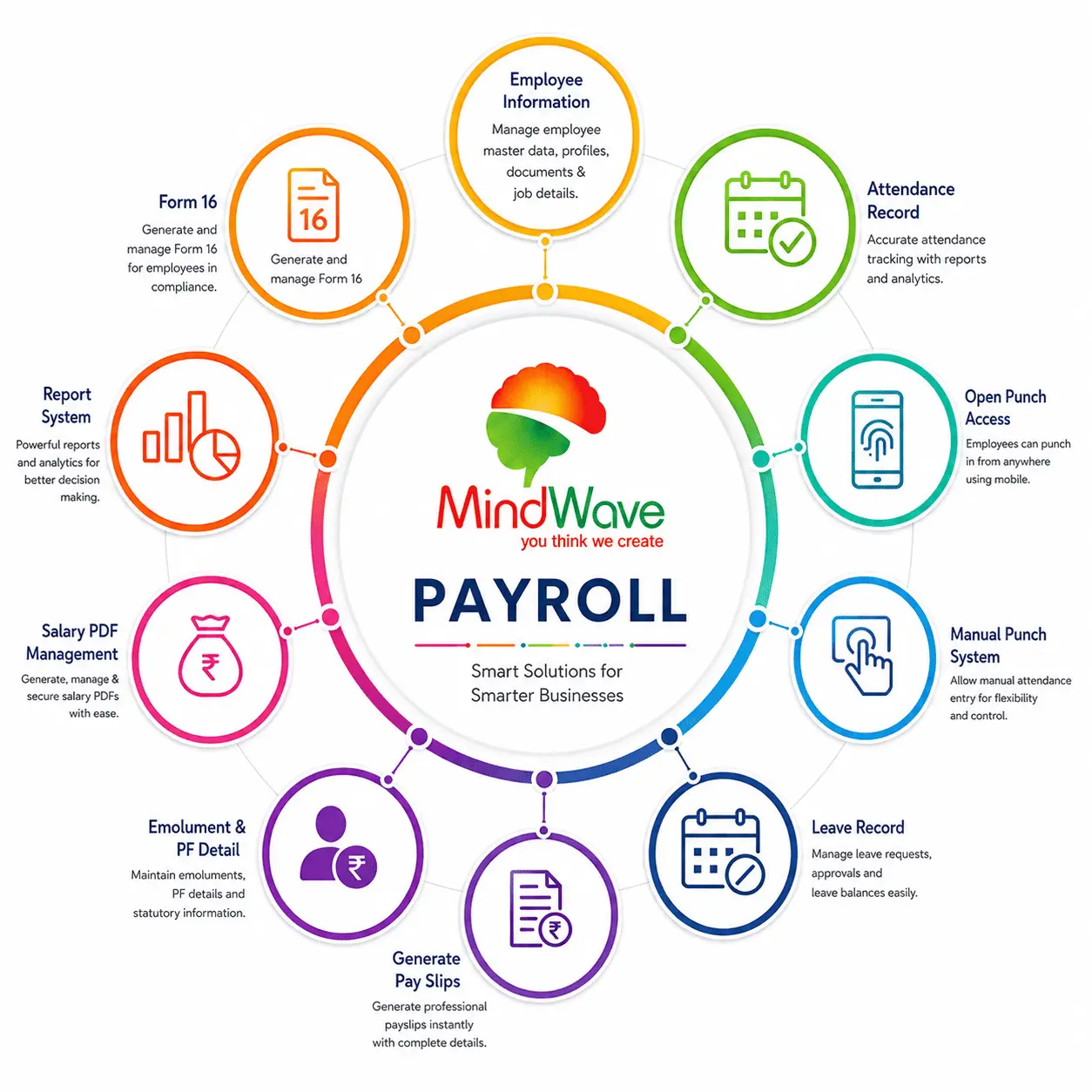
Unified attendance and payroll software turns one verified punch into a payroll-ready number
What This Comparison Covers
- Why combine them at all
- Types of tools compared
- Must-have features
- How attendance feeds payroll
- Statutory compliance
- The real cost model
- How to choose one
- The monthly cycle
- Employee self-service
- Industry fit
- Implementation & rollout
- Data & security
- Buyer's checklist
- Switching systems
- Delhi NCR to pan-India
- True total cost
- Common mistakes
- Capture channels
- Demo guide
- FAQs
Why Attendance and Payroll Should Share One Record
Every time data crosses a boundary, accuracy drops and effort climbs. The manual bridge between attendance registers and the salary sheet is where most payroll mistakes in India are born.
No re-typing, no fat-finger errors
Verified hours export to the salary sheet automatically. The difference between a 170-hour month and a 190-hour month is never a typing slip again.
Faster salary cycles
Attendance reconciliation that used to take two days compresses to minutes, because rules run on the recorded punch instead of a human reading a register.
One source of truth
Payroll, HR and the manager all read the same verified record. Disputes about "I actually came that day" are settled by the system, not by memory.
The payroll figure is only as accurate as the attendance feeding it. That is why the best attendance and pay sheet software does not stop at recording punches - it applies shifts, leave, overtime and deductions before the salary run even begins.
Think of the payroll cycle as a pipe. Every hand-off in the pipe - from register to spreadsheet to payroll head - is a leak point for accuracy and a sink for time. The moment attendance and payroll share one verified record, the pipe stops leaking where it counts: the salary your employees are paid.
For a Delhi office with a handful of staff, the leaks are annoying. For a multi-site Indian company with shift workers, field staff and statutory deadlines, they become the difference between a clean month-end and a four-day scramble. That scaling behaviour is exactly why so many growing businesses replace split tools with a unified attendance management system.
Attendance + Payroll Options Compared in 2026
Indian employers pick from four broad architectures. Each can move hours toward payroll, but they differ in how much human work survives between punch and salary.
| Option | How it captures | Payroll link | Best for |
|---|---|---|---|
| Biometric machine + spreadsheet | Fingerprint or face at the site | Manual export, manual fix | Tiny shops with few staff |
| Standalone attendance software | Machines, mobile, web | Export file, import to payroll | Companies already happy with payroll |
| Full HRMS with payroll | Biometric, mobile GPS, face, QR | Built-in, live, no export | Growing and multi-site businesses |
| Payroll-only tool with attendance add-on | Usually manual or mobile | Native but thin | Payroll-first firms |
Each architecture can be made to work, but the hidden cost of the split options is the bridge between them. Every export, format mapping, reconciliation and re-import is a place where errors enter and hours disappear. That is why the comparison in 2026 keeps returning to integration depth, device support and statutory coverage rather than raw feature counts.
Ask vendors which biometric and face machine brands their software natively discovers and writes to. Many tools claim integration but only read one brand, or require a paid connector per device model. Native support removes that surprise.
If your team already runs payroll comfortably, a standalone attendance payroll software with a clean export may be enough. If month-end still feels chaotic, a unified HRMS payroll software removes the biggest remaining step rather than adding another one.
Must-Have Features in Attendance Salary Software
Feature lists are long, but a handful separate tools that produce clean salaries from tools that only look good in a demo.
- Shift and overtime rules that auto-grade every punch against the roster before payroll sees it.
- Leave and ESS in the same record, so approvals change the payable days instantly.
- Multiple capture channels - biometric machines, face, mobile GPS, web - writing to one timeline.
- Statutory support for PF, ESIC, PT, LWF and the 2026 pay rules that keep changing.
- Audit trail so every edited punch and every recomputed salary can be traced.
Two features that buyers routinely overlook are the ones that decide whether software survives contact with a real Indian office. The first is language and format support - payslips, challans and Form 16 in the formats your bankers and employees actually expect. The second is schedule-friendly time handling: weekly offs, second Saturdays, festival holidays, compensatory offs and shift swaps that differ by state and by site.
| Capability | Impact on Real Work |
|---|---|
| Biometric machine integration | Fingerprint and face punches sync automatically, no USB exports |
| Mobile GPS attendance | Field staff mark attendance with location proof, merged with gate punches |
| Face recognition with liveness | Contactless capture that is hard to proxy |
| Leave policy engine | Earned leave, casual leave, sick leave and carryover rules applied across the year |
| ESS portal & app | Employees raise leave, view payslips and correct punches themselves |
| Report builder | Headcount, absenteeism and overtime reports that owners actually read |
Ask for the monthly reports the owner will look at twice: today's in-office headcount, the month's absenteeism leaders, and the overtime total before payroll runs. If those three reports cannot be produced in five minutes, the software is more demo than system.
How Attendance Reaches Payroll in a Unified System
The value is in the journey, not the punch. In MindWave HRMS and similar unified HRMS payroll software, the path is deliberate and traceable.
- Capture: employees punch via biometric, face, mobile GPS or web clock.
- Verify: face liveness, fingerprint match or geofence confirms the punch is genuine.
- Grade: shifts, late marks, half-days and overtime are applied against the roster.
- Approve: leave requests and manual corrections merge into the daily record.
- Compute: the salary engine reads the finalised month and runs statutory rules.
- Disburse: bank-ready files and payslips are generated without re-entry.
Notice what is absent from that chain: no file downloads, no format mapping, no human re-keying. Each step hands clean data to the next, and each step is auditable. That is the structural difference between "software that helps payroll" and "software that owns the record".
Trace one employee through the demo end to end - a fresh hire, a leave, an overtime night, a missing punch, a payslip. Cheap software managers to build one nice screen; good systems keep every screen consistent because they read one record.
Because the attendance salary software and the payroll engine share one database, the salary run never depends on someone remembering to export, transform or re-import a file. That is the difference between automation and a shorter manual process.
Statutory Compliance Built Around Verified Attendance
PF, ESIC, professional tax and minimum-wage rules all lean on the hours and days an employee actually worked. A unified record makes those numbers defensible.
PF and ESIC on real wages
Overtime and leave-in-lieu that change gross pay flow into PF and ESIC calculations automatically, so challans match the books.
Minimum wage and overtime proof
When a regulator asks, you can show verified daily punches that produced the overtime line - not a spreadsheet someone typed last night.
Beyond the well-known four, payroll software in India increasingly carries related obligations: labour welfare fund, professional tax across different states, the code-wise wage structures reforming overtime definitions, and employer-specific rules like gratuity eligibility. The software's job is to keep these current and connected to the verified attendance that generates the numbers.
| Obligation | What It Depends On | How Verified Attendance Helps |
|---|---|---|
| PF (EPF/EPF) | Monthly wages after eligible deductions | Unpaid leave that changes pay reflects automatically |
| ESI (ESIC) | Wages and days covered under scheme | Accurate paid days keep monthly returns consistent |
| Professional Tax | State-by-state slab on salary | One configured rule per state, no manual slab lookup |
| TDS (Income Tax) | Gross salary, exemptions, deductions | Overtime and variable pay included before tax runs |
| Gratuity | Continuous service and last drawn wages | Dated, accurate attendance supports service claims |
Before choosing, ask the vendor for a walkthrough of a full month-end run with your state's professional tax and any site-specific rules. Compliance features look identical in brochures and behave very differently in practice.
The Real Cost Model: Unified vs Split Tools
The cheapest software is not the cheapest system. Compare total cost of ownership: licences, devices, training, and the hours your accounts team spends every month.
| Cost driver | Unified HRMS (e.g. MindWave) | Split tools + export |
|---|---|---|
| Monthly licences | One per-employee fee | Two or three fees |
| Biometric devices | Included in the plan | Same hardware, extra licence |
| Month-end effort | Minutes | Hours of export, fix, import |
| Error cost | Near zero | Salary disputes and re-runs |
| Training | Once, one system | Once per tool, plus glue logic |
Megamind Technosoft prices MindWave HRMS as a single per-user plan that bundles biometric, mobile, leave and payroll. For most companies in Delhi, Noida and across India, the unified plan works out cheaper than two systems plus the monthly reconciliation hours.
How to Choose the Right Attendance Payroll Software
A short, repeatable process beats reading fifty feature pages. Use this five-step filter with any shortlist.
- Map your workforce: count sites, shift patterns, field staff and salary structures first.
- Test your own rules: run one month of real data in a free demo before any payment.
- Check the devices: confirm which biometric and face machines the software natively supports.
- Verify support: an India-time vendor that answers the phone matters more than a cheaper price from a distant one.
- Read the contract: watch for setup fees, per-device surcharges and lock-in on data export.
Ask for a live demo with your own shift pattern and a statutory challan. If the vendor cannot make your real month-end work in the demo, they will not make it work after you pay.
The final filter is cultural as much as technical: pick a partner who behaves like your accounts team would - precise, deadline-driven and easy to reach. A workplace tool is only as good as the people who run it, and the vendor who supports them is part of your team.
The Month-End in a Unified Attendance Payroll Software
If you have ever survived a manual month-end, you know the ritual: export punches, chase registers, type hours, cross-check overtime, reconcile leave, pray over statutory numbers, and finally run salary. A unified attendance payroll software replaces that ritual with a locked, repeatable sequence.
| Old Manual Way | Unified System |
|---|---|
| Export punches from machines | Punches already live in the cloud |
| Type hours into a spreadsheet | Shift rules grade hours automatically |
| Chase managers for leave approvals | Leave and corrections approved in-app before close |
| Reconcile overtime by hand | Overtime computed against the roster |
| Manually compute PF, ESI, PT, TDS | Statutory engine runs on verified earnings |
| Generate payslips and bank file | Both generated in one run, without re-entry |
A good system closes the month with a lock. After you click "finalise", punches cannot quietly change underneath payroll - and if an exception appears, it is handled through a documented correction flow, not a silent spreadsheet edit.
Employee Self-Service: The Front Line of Data Accuracy
Payroll disputes rarely start at the salary calculator - they start with an employee who could not see their own punches. Employee self-service (ESS) puts the daily record in everyone's hands, and that single change removes most disputes before they reach payroll.
Self-service punch checks
Employees see their own punches daily and raise corrections while the facts are fresh - not at month end from memory.
Leave without chasing
Leave requests route to the right approver, and approved leave updates the payroll record automatically.
Payslips anywhere
Employees download payslips and Form 16 on their own, ending the email-and-photocopy queue in HR.
Fewer disputes
When everyone reads the same verified record, "I worked that day" becomes a view in the system, not a memory contest.
Roll ESS out with a ten-minute training session, not just an email. Employees who can check their own punches and raise leave correctly are the strongest quality control your payroll will ever have.
Attendance + Payroll Software Across Indian Workplaces
The same unified platform takes very different shapes depending on the workplace. India's mix of offices, factories, hospitals, schools and gig-heavy businesses means the flexible system wins by default.
| Workplace | Capture Mix | Payroll Complexity |
|---|---|---|
| IT & corporate offices | Biometric + mobile GPS + WFH | Multi-state PT, reimbursements, variable pay |
| Factories & plants | Fingerprint at gates, biometric shifts | Overtime, LOP, statutory-heavy hourly wages |
| Hospitals & clinics | Face recognition, 24x7 rosters | Rotational shifts, night allowance, duty doctors |
| Schools & colleges | Fingerprint or RFID for staff | Annual contracts, ad-hoc classes, consolidated pays |
| Retail & hospitality | Mobile GPS, store-wise devices | High turnover, per-store reports, quick onboarding |
| Logistics & distribution | Mobile GPS + geofenced warehouses | Route-linked hours, per-trip incentives |
Whatever your industry, insist the vendor demonstrates your own pattern - your shift structure, your statutory mix and your report set - in the demo. The software that adapts to your workplace, not the other way round, is the one to keep on the shortlist.
Implementation and Rollout: What Happens After You Buy
The buying process ends with a signature; the value starts with a rollout. A disciplined implementation - especially across multiple sites in Delhi, Noida, NCR and beyond - is the difference between a smooth salary run and a messy first quarter.
- Discovery and data collection: employee master, salary structures, shifts, leave policy and statutory settings gathered once.
- System configuration: rules are built in the software, not promised in slides.
- Device integration: biometric and face machines at each site connect and sync to the cloud.
- Data migration: opening balances, previous month attendance and prior year earnings are loaded cleanly.
- Parallel run: one month where the new system and the old run side by side, and differences are understood.
- Training: HR, payroll, managers and employees are shown their own screens.
- Go-live and support: the first live month-end runs with the vendor on the phone.
Do not skip the parallel run for "speed". One reconciled month of overlap surfaces every assumption - shift edge cases, statutory quirks, rounding rules - while your old process still protects the business.
For a pan-India company, ask how the vendor handles state-wise rules (professional tax, minimum wage, labour law variations). The ability to configure per-state settings from one dashboard is the real test of national readiness.
Payroll Data Security: What a Responsible Vendor Ships
Attendance and salary data is among the most sensitive information an Indian company holds - employee identity records, biometric templates, bank details and earnings. A vendor worth trusting should be able to demonstrate, not just claim, a responsible security posture.
- Encryption in transit and at rest: data moving between devices, apps and the server, and while stored, is encrypted.
- Role-based access: HR staff, managers, payroll and auditors see only what their role should see - and every view is logged.
- Independent certification: standards such as ISO 27001 are meaningful signals of a mature security programme.
- Backups and recovery: regular, restored-and-tested backups, because a payroll system must survive any single point of failure.
- Data portability: a clear, tested way to export your data if you ever leave - no hostage-taking at contract end.
Before signing, ask for a one-page answer to three questions: where is my data stored, who can access it, and how do I export it? Vendors who walk you through a written security summary are rare and precious.
The Attendance + Payroll Buyer's Checklist for India
Use this checklist with every shortlisted vendor. It compresses the whole guide into questions that produce written, comparable answers.
- Which biometric and face machines does it natively integrate with?
- Does it include mobile GPS attendance and ESS in the pricing?
- Are PF, ESIC, PT, LWF, TDS and minimum-wage rules configured for my states?
- Can I run one full payroll cycle from attendance with no file transfer?
- What do payslips, challans and the bank file look like?
- Who installs devices in Delhi, Noida, NCR and beyond, and what are the response times?
- What is the all-in cost per employee, and what renewals or surcharges exist?
- What is the exit process - data export and cancellation - in writing?
Send this checklist as a written request for proposal. Vendors who answer every line promptly and precisely are the ones who run clean payrolls; vendors who vanish after the sales pitch will vanish after the signature too.
Common Mistakes When Choosing Attendance Payroll Software
Most failed implementations fail for the same handful of reasons. Recognising them early keeps your payroll on track.
- Judging by screenshots: every vendor's dark dashboard looks identical. Run your own month of data before believing any demo.
- Ignoring device fit: beautiful software that cannot talk to your existing attendance machines is a beautiful dead end.
- Underweighting support: a payroll system fails fast without responsive, India-time support - cheap price cannot outrun a silent help desk.
- Skipping the parallel run: the first month is not the time to discover your rounding rules are wrong.
- Neglecting statutory changes: rules change every year; confirm the vendor updates PF, PT and minimum-wage tables as part of the service.
If you are buying for multiple sites, demo with data from your messiest site, not your cleanest. Software that survives your worst month will handle your average month easily.
Switching From Spreadsheets or an Old System
Most companies buying an attendance payroll system today are not starting fresh - they are leaving Excel, a legacy desktop payroll, or a mix of both. Migration is where the new system proves itself, and a little planning prevents a messy start.
Clean the master data first
Duplicate employee records, missing PAN numbers and stale bank accounts all surface during migration. Fixing them up-front beats fixing them in production.
Carry the history you need
Opening balances, prior-year earnings for Form 16, and this month's attendance are the non-negotiable items. Decide the rest by seniority and legal need.
Map, then verify
Column mapping, code mapping and payroll head mapping are done once, then validated against a sample month before the full load.
Cut over on a boundary
Switch at a month or quarter boundary so the old and new system never split a payroll period.
Ask your shortlisted vendors how they handle migration in practice. A vendor who has moved companies of your size and complexity before can name the common mistakes and the safeguards - that experience is worth more than a cheaper licence.
From a Delhi NCR Office to Pan-India Payroll: Deployment Scenarios
Buyers often ask whether a unified attendance payroll software suits a single Delhi office, a group of NCR branches, or a company spread across India. The answer is the same platform at three different scales.
| Scale | What Works | Watch-Outs |
|---|---|---|
| Single office in Delhi or Noida | One device, cloud software, ESS and payroll - live in days | Don't overpay for capacity you won't use |
| Multi-branch across NCR | Per-site devices and shifts, one dashboard, one payroll | Nail down per-site support visits and response times |
| Multi-state pan-India | State-wise PT, minimum wage and statutory configuration | Verify every state's rules and the vendor's update cycle |
| Hybrid office + field workforce | Biometric gate + mobile GPS + geofenced punches merged | Agree the GPS boundary and the grace distance up front |
Megamind Technosoft installs biometric and face devices across Delhi, Noida and NCR and supports payroll for the whole of India from a single cloud tenant. Local installation, pan-India software - that combination is what growing companies should hold out for.
Beyond the Licence: The True Total Cost of Payroll Software
The subscription fee is the visible tip of the cost iceberg. Below the waterline sit devices, installation, training, migration, statutory updates and - the biggest line of all - the cost of payroll errors and reconciliation time.
| Hidden Cost | How It Shows Up |
|---|---|
| Device acquisition | Biometric and face machines at every gate, sometimes recurring licence per device |
| On-site installation | Mounting, wiring and enrolment - often extra for smaller vendors |
| Training & change management | HR, payroll, managers and employees all need their own session |
| Migration effort | Cleaning master data and loading history accurately takes real man-hours |
| Statutory maintenance | Without updates included, your compliance drifts each year |
| Error cost | Overpaid salaries, disputed overtime and re-runs - far larger than any licence |
The honest comparison is total cost over three years across the whole bundle. In that view, a unified attendance payroll software with devices included, local installation and statutory updates usually matches or beats the "cheaper" split tools once reconciliation hours are counted.
Ask vendors for a three-year all-in quote covering licence, devices, installation, training, migration and support. Vendors who quote this way are pricing responsibly; vendors who only talk monthly per-head cost are leaving lines off the sheet.
Every Way an Employee Can Mark Attendance, One Record
A unified attendance payroll software is only as unified as its capture. Modern systems accept many ways to punch, layer identity checks over them, and blend everything into a single timeline that payroll trusts.
| Channel | Who Uses It | Identity Strength |
|---|---|---|
| Fingerprint machine | Factory and office staff at gates | High - biometric match |
| Face recognition | Corporate lobbies, high footfall | High - with liveness check |
| RFID card | Large simple teams, contract staff | Medium - cards can be shared |
| Mobile app with GPS | Field sales, site engineers | Medium - location + device proof |
| Geofenced app punch | Remote and hybrid workers | Medium - boundary enforced |
| Web / kiosk clock | Back-office and overflow desks | Medium - login protected |
The magic is not in any single channel - it is in the merge. A field executive's GPS punch and an office worker's face scan land on the same employee timeline, get graded by the same shift rules, and feed the same salary run. No one has to reconcile two systems because there was never two systems.
Ask the vendor how a manager's manual correction is treated versus a machine punch. The honest answer is: machine punches are trusted, manual edits require approval and are logged - that asymmetry is what preserves payroll integrity.
How to Run a Demo That Actually Tells the Truth
Vendors curate demos; buyers should de-rail them politely. A structured, adversarial demo reveals in ninety minutes what marketing pages hide in nine months.
- Bring your own data: load one month of real attendance and salary, with several edge cases you know caused pain.
- Test your messiest rules: night shifts, double shifts, comp-off, half-days, late punches, public holidays in Delhi, state holidays in your other hubs.
- Ask for the month lock: watch the finalise step and what happens to a correction submitted after it.
- See the reports you read: headcount, absenteeism, overtime, unpaid leave - your reports, your layout.
- Demand the exit demo: ask to see the data export and the user-removal screens, not just the pretty dashboard.
Bring the person who actually runs month-end to the demo. Their questions - about challans, bank files, Form 16 and where the PF number goes - are the ones that sort the real systems from the slideware.
Attendance and Payroll Software FAQs
1. What is the best attendance and payroll software in India?
The best one unifies verified punches with leave and salary in a single record. MindWave HRMS by Megamind Technosoft does this for Indian payroll rules, and you should validate it with your own month of data before deciding.
2. Can one software handle both attendance and salary?
Yes. A unified HRMS payroll software captures biometric and mobile punches, grades them against shifts, and computes the salary from that same verified record - no export and import step in between.
3. How does attendance software reduce payroll errors?
By removing re-typing. Verified hours, overtime and leave flow straight into the salary engine, so the classic "register says one thing, sheet says another" mismatch disappears.
4. Is payroll statutory compliance included?
Good systems include PF, ESIC, professional tax and minimum-wage rules in the same plan. Confirm your state's rules are configured in the live demo before you commit.
5. What does attendance and payroll software cost in India?
Expect a per-employee monthly fee, often with biometric devices bundled. A unified plan is usually cheaper than paying for separate attendance and payroll tools plus the monthly reconciliation effort.
6. Does it work for small companies and large factories alike?
Yes. The same attendance salary software scales from a 10-person office to multi-site operations, adding devices and shifts as the workforce grows without changing the payroll record.
7. Can the software handle biometric machines I already own?
Good systems support most common biometric and face machine brands natively or via clean CSV import. Confirm the exact models with the vendor before you buy, and ask whether integration needs any paid connector.
8. Is mobile attendance with GPS included in a unified plan?
Usually yes. A unified HRMS payroll software bundles biometric machines, mobile GPS with geofencing, ESS and payroll in one per-employee fee - so field and office staff land on the same payslip record.
9. How long does implementation take?
A single-site rollout can be configured in days, and a full payroll-ready go-live including the parallel run typically takes a few weeks. Pan-India deployments roll out site by site with the vendor's project plan.
10. What happens if my payroll software vendor stops updating the platform?
Statutory payroll becomes stale quickly, so choose a vendor with a published update history and India-time support. Data portability in your contract lets you exit cleanly if the service ever slips.
11. Do employees need training to use the portal?
A little. ESS portals are designed to be simple, and a short onboarding session covers punch checks, leave requests and payslips. Most employees become self-sufficient within a week.
12. Can I migrate from my current HRMS without losing history?
Yes, with a structured migration - master data cleaned first, opening balances and prior-year earnings loaded, and a parallel run to verify. Experienced vendors do this for companies your size every month.
13. How accurate does the attendance need to be before payroll runs?
Aim for fully reconciled attendance - every unmarked day explained by leave, absence or a documented correction - before the salary engine is told to run. The lock-and-approve workflow makes that state reachable every month.
14. Can I keep using my accountant's existing payroll format?
Most systems export employees, earnings and deductions in standard layouts that accountants can bring into their software or banks accept. Confirm the exact formats and the bank-file template during the demo with your accountant present.
15. Is attendance payroll software worth it for a small business?
Yes. The only thing worse than payroll complexity is payroll error at any size. A small team gets the same accuracy, payslips and statutory safety as a large one, at a proportionately small cost.
16. What training does my HR and accounts team need?
A few guided sessions covering configuration, month-end processing and statutory reports. Most teams run their first live month-end with vendor support on the phone, then handle the next one confidently.
17. Does the software support contractors and gig workers too?
Many modern HRMS tools add a contractor or flexi-worker profile alongside permanent staff, with its own capture and invoicing or daily wage rules. Ask the vendor to show a contractor-specific workflow if you plan to use one.
18. What happens on an internet outage across my sites?
Biometric devices buffer punches locally and sync when connectivity returns, so no punches are lost. Confirm the offline buffer size and backup behaviour with the vendor so a Noida or Delhi outage never touches payroll.
Final Verdict on Attendance and Payroll Software
In 2026, the winning setup is the one where attendance, leave and payroll read from a single verified record. Biometric machines, mobile GPS and face recognition all feed one timeline, and the salary run reads that timeline directly - no exports, no reconciliation marathons, no month-end panic.
Start by mapping your workforce and testing your real rules in a free demo. Megamind Technosoft, the ISO 27001-certified New Delhi team behind MindWave HRMS, installs biometric and face systems across Delhi, Noida and NCR and supports India-wide payroll - call +91-7982869398 or sales@megamindindia.in to run your month-end through it.
MindWave HRMS, Built by Megamind Technosoft
When you are ready to choose, start with the vendor who built the software behind this guide. Attendance and payroll working as one system is not a theory here - it is exactly how MindWave is architected. Megamind Technosoft is an ISO 27001-certified HRMS and attendance software company in New Delhi, and its flagship product - MindWave HRMS - unites biometric and face attendance machines, mobile GPS attendance, leave, employee self-service (ESS) and payroll into one accurate, payroll-ready record built for Indian businesses, schools, hospitals and factories.
From a Delhi NCR office to pan-India rollout, our team handles biometric installation, face and fingerprint devices, mobile GPS apps and payroll statutory rules in one contract. You get a local partner who installs on-site in Delhi, Noida and NCR, plus India-time phone and WhatsApp support - not just a toll-free number.
- Company: Megamind Technosoft Solutions Pvt. Ltd.
- Product: MindWave HRMS - Attendance, Leave & Payroll
- Address: 3rd Floor, C-41, Pandav Nagar Complex, New Delhi - 110092, India
- Phone: +91-7982869398 | +91-9818442254
- Email: sales@megamindindia.in
- Website: www.megamindindia.in
- Timings: Mon - Sat, 9:30 AM - 6:30 PM IST