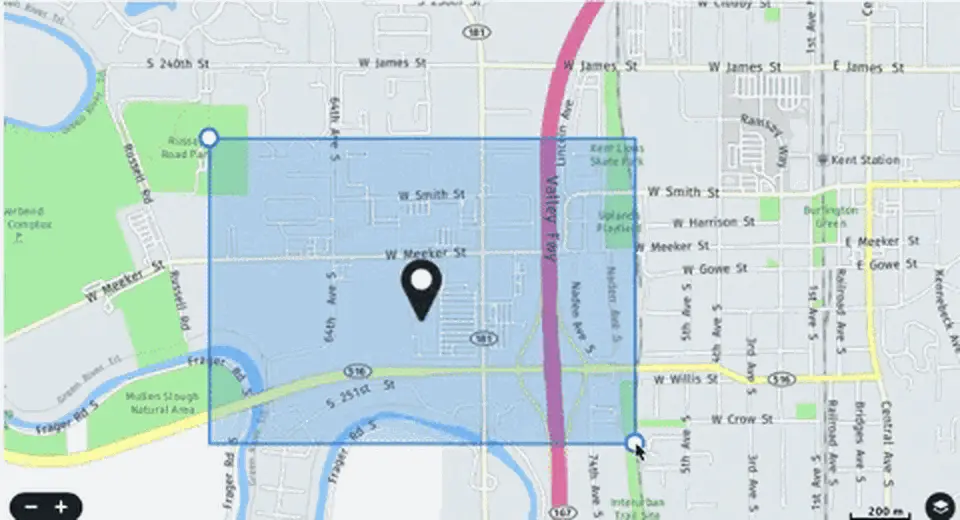
GPS geofencing attendance for remote and field teams
What is a GPS attendance system?
A GPS attendance system records an employee's location at the moment they punch in, so field and remote workers can prove real presence. Administrators first draw virtual boundaries called geo-fences around sites, then the app only lets a check-in through when the phone's coordinates fall inside that radius, and a live selfie confirms the person, with all records flowing into a reporting screen and payroll.
Best For
In This Complete Guide
By the end of this guide, you'll learn:
- How GPS geo-fencing works step by step
- How to set check-in and out radius
- Use for field employees and roaming teams
- Anti-proxy with a live selfie
- Standard geofence reporting
- Privacy and permission best practices
- Frequently asked questions
Table of Contents
What Is a GPS Attendance System?
A GPS attendance system is a location-aware way to record working time. Instead of a wall clock, an employee opens an app, the phone reports its coordinates, and the system decides whether that position is valid for the shift, then stamps the time. It's the natural attendance tool for employees who are never standing at one desk.
Because it combines time and place, it answers two questions every manager used to guess about: "Are they there?" and "Where exactly is there?". And with a selfie check built in, it also answers "Is it really them?". This makes it a strong choice for anyone running a distributed or field workforce.
Key idea: GPS attendance is attendance tied to real coordinates, not just real time. That location-plus-time pairing is what replaces guesswork with evidence.
How GPS Geo-fencing Works
Geo-fencing is the mechanism that decides if a location is allowed. Here is the workflow an HR sets up once, and employees then interact with every day.
Draw the boundary
An administrator marks a virtual area around each office, site, or depot in the software
Employee checks-in
The field worker opens the app and the phone reports its live coordinates and time
Selfie & face check
A live selfie confirms it is the same employee and not a parked phone or proxy
Fence verdict
The system compares coordinates with the radius and approves or rejects the punch
Synced to reporting
The record flows to the attendance screen, HRMS, and ultimately to payroll for validation
Setting the Right Check-in Radius
The geo-fence radius has to balance two goals: it must be small enough to be meaningful, yet large enough for real GPS drift. Phones typically report a few metres to a few tens of metres of accuracy, depending on GPS signal and building layout.
| Site Type | Suggested Radius | Consideration |
|---|---|---|
| Small office / shop | 30 – 80 m | Tight for good GPS; keep modest values |
| Factory / plant | 100 – 300 m | Allow movement inside a large boundary |
| Warehouse / depot | 150 – 400 m | Cover loading and parking areas |
| Roaming / no fence | Unlimited | Log location anyway; rely on selfie & time |
Start with a sensible default, then tune it after a week of live punches. If you see many false rejections near buildings or in tight sites, adjust. If you see punches far from the real door, tighten. The goal is a quiet system that catches deliberate misuse without annoying any honest field worker.
Tip: When first rolling out, review a month of geolocation-exceptions before penalizing any employee. There is a few rules about GPS and urban buildings that need real data, not guesses.
Anti-Proxy with a Live Selfie
The classic failing of any remote attendance is "buddy check-in" and location spoofing. Someone parks the phone near the site, or logs in from home while claiming the office. A live selfie closes that loophole.
On each unattended punch, the app requests a photo taken now. The face is matched against the stored profile and the photo's real time. This makes it much harder to use a parked phone, a borrowed device, or a stolen image. And when employees ask "why the selfie?", the system should simply answer: it proves you were there, in person.
Note: Pair the selfie with an occasional random two-factor prompt. As randomness grows, attackers can no longer predict when the second factor will trigger, which makes fake loops far harder.
Field Employees & Roaming Teams
The biggest use of a GPS attendance system is the field. Take delivery partners who roam a city, engineers who visit ten clients, or sales reps covering districts. A fixed clock was never an option for them, and call-ins were easy to challenge. GPS attendance solves exactly this hole.
For each field visit, the system records the client address, the arrival and departure, and a selfie proof. Managers finally see the day in context: who visited whom, how long it lasted, and for roaming teams it still logs the site even without a fixed office.
Logistics & delivery
Proof at every drop point, with location stopping detours or ghost deliveries.
Construction
Site-based presence for crews and supervisors on each project location.
Auditing & service
Auditors and field service bind every validation to an exact physical presence.
Reports That Turn Location Into Insights
Location alone is data; reporting turns it into decisions. A good GPS system exposes these views, so HR, operations, and line managers stay on the same page.
- Daily punch logs with coordinates and geo-fence verdict
- On-time, late, and missing dip reports per employee
- Site/hours visit summaries for each client or project
- Team or branch dashboards showing daily attendance
- Exception feeds for punches outside the radius or time
Feeding this into an attendance management platform means those reports connect to leave, overtime, and payroll. A single source of truth beats juggling spreadsheets from every field team.
Privacy & Permissions Done Right
Location is a sensitive personal signal, so responsible deployment matters as much as the gathered data. A fair GPS system collects location only when an employee in attendance, asks for explicit permission, and explains the purpose in plain terms.
- Collect location only during a punch, not all-day silently
- Explain in the app what data is taken and why in plain equal
- Fall back to face/manual for staff who refuse location
- Keep location feeds in role-based, time-limited reports
Note: The organizations that keep team morale are those where location tracking for the field is framed as accountability, not as surveillance. Communicate the "why" often.
Why Teams Adopt GPS Attendance
1. Proof-punched attendance
Every record is evidence of who, where, and when, which ends "I was there" debates.
2. Real anti-proxy
Selfies close the parked-phone and friend-punch loopholes common to old field tracking.
3. No hardware at each site
No need to install an employee machine at every visit site; the phone is the terminal.
4. Field productivity visibility
Managers see active sites vs idle time, so resource planning gets sharper.
5. Offline resilience
Punches queue offline and sync later, including the stored location and time.
6. Cleaner payroll
Verified field records feed payroll directly, removing calls and spreadsheets.
What GPS Actually Records, and What It Doesn't
It is worth being precise about what GPS does and does not do. A phone's GPS chip triangulates its position from satellite signals to produce coordinates and an accuracy estimate. The app then attaches a timestamp and, depending on your settings, a selfie, and that full bundle is what becomes the attendance record.
What GPS does not do is tell you what the employee was doing, only where the phone was and when. That is an important distinction for any policy conversation. Indoor locations can weaken the signal and stretch the radius, tall buildings create a canyon effect, and a phone that was left in a car still reports the car. Understanding these limits is what stops you from over-trusting or under-trusting the data.
Key idea: GPS attendance is about place and time, and only that. Add face verification for identity and let your approval workflow handle intent. No single sensor tells the whole story.
Tuning the Fence After Go-Live
The radius you set on day one is rarely the radius you want by week four. GPS accuracy varies with urban density, weather, and the age of the phones on your team, so the fence needs a short, deliberate tuning period.
Run the first two weeks in "log only" mode, where every punch is accepted but the system records whether it fell inside the fence. At the end of that window, look at the real distribution of punches. If honest employees keep landing outside, your radius is too tight. If the map shows a cluster of suspiciously convenient "in-fence" punches from one person's parking spot, it may be too loose for your trust model.
Tip: Tune per site, not globally. A tight downtown office and a sprawling factory need different numbers, and a single organization-wide radius usually guarantees someone is always frustrated.
Permissions & Consent, Step by Step
A GPS system touches two sensitive areas at once: the employee's phone and the employee's location. Doing it with care protects the rollout from day-one resistance and keeps you on the right side of data norms.
- Ask for location permission only when the app needs it, and explain it once in plain language
- Offer a clear alternative: if an employee refuses location, keep a face-punch and manual approval path
- Store only the coordinates needed for attendance, not a continuous movement trail
- Limit who can view location data and expire old records on a schedule
Organizations that explain "we use GPS to prove your site hours, not to watch you move" report far fewer complaints than those that silently switch tracking on. Transparent intent is a feature, not a trade-off.
Offline Punching on the Road
Field work is exactly where networks are worst. Basement storerooms, industrial outskirts, and highway pull-offs all lack reliable data, yet attendance still must happen. Offline support is not a nice-to-have in GPS attendance, it's a core requirement.
When the app punches offline, it stores the timestamp and whatever location fix it could get. On reconnecting, it syncs the record and the fence check runs then, using the same coordinates. Some apps use the phone's cached GPS and network data to get a reasonable fix even without internet, so the record stays useful instead of blank.
Note: Set an explicit policy for offline punches. For example, require a selfie on offline punches or auto-flag records that sync late, so "no signal" never becomes an invisible excuse for missing attendance.
Why GPS Beats Call-Ins for Field Teams
Before GPS attendance, a field employee's day was reported by phone, message, or the honesty of the whole team. Managers either trusted the call-in or suspected the worst, and payroll rebuilt a puzzle from scraps of memory and messages.
GPS attendance replaces that guesswork with a record that is cheap to create, hard to fake, and easy to verify. It also protects the employee: a field worker with verified attendance no longer needs to argue for a full day's pay when a client meeting ran long. The system simply shows the visit.
Tip: Frame the rollout to field staff as proof of their own work. Teams adopt quickly when they realize the record protects them as much as it protects the company.
Common GPS Attendance Scenarios
A few real-world situations come up again and again, and knowing how the system handles them is part of an honest evaluation.
Employee forgets the phone
The app flags the missing punch; HR approves a manual correction on request, keeping one audited exception path.
Client site is a building campus
A generous campus fence covers parking and entrances; the selfie still proves the person is physically present.
Storm delays the field day
The system logs real arrival and departure, so payroll sees genuine hours rather than a flat default.
Core Features of a GPS Attendance System
Not every "GPS attendance app" is the same. The features below separate a proper location-aware attendance platform from a simple clock app that merely shows a map. Compare these capabilities when shortlisting vendors for a mobile attendance app with GPS.
Geo-fencing with multiple fences
Draw unlimited boundaries around offices, client sites, depots, and branch offices, assign each fence to a team or shift, and approve punches only inside them.
Selfie & face verification
A live photo on each punch confirms the identity of the person checking in, closing the parked-phone and buddy-punch loopholes that plain GPS cannot catch.
Check-in & check-out radius
Per-site radius controls mean a small shop can use a tight 50 m fence while a large factory campus gets a generous boundary, tuned separately.
Offline punch buffering
When a field worker enters a basement or a low-signal industrial area, the punch is stored on the phone and synced automatically once connectivity returns.
Location & shift reports
Daily punch logs, site visits, late arrivals, exceptions, and per-team dashboards turn raw coordinates into decisions about coverage and productivity.
Payroll-ready approval flow
Approved punches, exceptions, overtime, and location-proof records flow into payroll, so field hours become salary inputs without manual re-entry.
Who Benefits Most from GPS Attendance in India
From the NCR to Tier-2 cities, industries with roaming workforces feel the benefits most sharply. Here is how a GPS attendance system fits the typical field-heavy sectors across Delhi, Noida, Gurugram, and beyond.
Logistics & Last-Mile Delivery
Drivers and delivery partners punch at every depot and drop point with location proof, so dispatchers and finance finally see real routes, detours, and site hours.
Field Service & Technicians
Cable, appliance, and elevator technicians visit many clients daily. GPS punches document every arrival and departure, protecting both the technician's work hours and the company's billing.
FMCG & Pharma Sales Reps
Sales teams covering districts need proof of every distributor and chemist visit. GPS attendance ties each call to real coordinates for travel claims and route planning.
Construction & Site Projects
Crews and subcontractors move between project locations. Fences around each site plus selfie verification keep the attendance register accurate per project.
Healthcare & Home Care
Home-visit nurses and physiotherapists can log each patient visit with location proof, benefiting both the care roster and the patient's billing records.
Auditors & Survey Teams
Auditors, inspectors, and surveyors cover many sites in a week. GPS records, selfie proof, and site reports make every validation verifiable on demand.
GPS Attendance vs Older Field-Tracking Methods
Before GPS, field teams were tracked through phone calls, paper logs, WhatsApp messages, or shared spreadsheets. Here is how those stack up against a mobile GPS attendance app.
| Capability | Phone Call-In | Paper / Register | Spreadsheet | GPS Attendance App |
|---|---|---|---|---|
| Who was there | Self-reported | Self-reported | Manually entered | Selfie verified |
| Where they were | No proof | No proof | No proof | Coordinates + fence |
| When they punched | Approximate | Manual timestamps | Often off by days | Automatic timestamp |
| Payroll readiness | Re-entered manually | Typed at month-end | Copy-paste, error-prone | Direct feed to payroll |
| Proxy risk | High | High | High | Very low |
| Audit trail | None | Weak | Weak | Complete and time-stamped |
Note: Old methods are not "wrong" for a two-person setup, but once a business has a roaming team of ten or more, the cost of re-entering and reconciling locations, hours, and claims grows faster than the team itself.
Cost of a GPS Attendance System & ROI
A GPS attendance system is one of the most affordable ways to bring automation to a field workforce, because it requires no hardware at each site. Here is how teams typically think about the cost and the payback.
The software is usually offered as a per-employee monthly or annual licence, because the employee's own phone is the terminal. There are no readers to buy, no biometric devices to install at every depot, and no cabling. Some vendors also offer a lite version for smaller teams, while enterprise plans add shift management, leave, payroll, and API access.
What you save
Eliminating proxy punches and manual spreadsheet consolidation typically recovers the annual licence cost within a few pay cycles for even a modest field team.
What you avoid buying
No attendance hardware per site, no GPS trackers bolted to vehicles, no desktop software per office. The phone each field worker already carries does the job.
Where the ROI shows
Fewer payroll corrections, faster month-end closure, verifiable site claims for clients, and honest route evidence that reduces time theft and disputes.
Rolling Out GPS Attendance in Two Weeks
Unlike hardware attendance, a GPS rollout needs no installation crews. A careful two-week plan gets a field team live with minimal friction.
Map sites & set fences
List every office, depot, and client site on a map, draw the fence radius per site, and assign teams and shifts.
Explain privacy & consent
Tell the team exactly what is collected (location at punch and a selfie) and why, and collect consent before rollout.
Pilot on one team
Run one sales or delivery team for a week in log-only mode to tune radiuses against real GPS behaviour.
Train & share support
Send a one-page FAQ in English and Hindi, share a support number, and show supervisors how to read exceptions fairly.
Go live & review weekly
Switch the whole field team on, review exception reports every week, and tune fences or policies as real data arrives.
Common GPS Attendance Mistakes to Avoid
The technology is simple; the mistakes are policy mistakes. These are the ones we see most often when Indian companies move field teams to GPS attendance.
1. One radius for everything
A single company-wide radius either rejects honest downtown shifts or accepts convenient parking-lot punches. Tune per site, always.
2. Surveillance framing
Teams resist GPS when it feels like spying. Frame it as proof of their own site hours and treat exceptions with grace in the first month.
3. No offline policy
Without a written rule for no-signal punches (require a selfie, auto-flag late syncs), "no network" becomes a catch-all excuse at month-end.
4. Skipping the pilot
Jumping straight to company-wide go-live guarantees a flood of exception tickets. A one-week pilot on one team prevents all of it.
5. Ignoring the selfie
GPS location alone cannot stop a friend who carries two phones. Keep selfie verification on for every unattended punch.
6. Data without owners
Location reports should be visible only to role-limited managers, with old records retired on a schedule, and one person responsible for answering employee questions.
Connecting GPS Attendance to Payroll & Shift Rules
A GPS attendance system becomes a workforce platform when it connects to shifts, leave, and payroll. Here is how the pieces fit together for a field-heavy workforce.
Each verified punch is classified against the employee's assigned shift and site. Late arrivals beyond a grace window are flagged, early departures are captured, and unplanned absences roll up into the attendance register. When it is time to run payroll, approved punches convert into payable days and overtime automatically, and the payslip is generated from the same verified record the supervisor saw in the dashboards.
- Field hours, overtime, and site allowances computed from verified punches only
- Manual corrections limited to audited exception approval before payroll closure
- Travel and site claims linked to the location records that prove them
- Statutory components such as PF, ESI, and PT applied consistently for all employees
- Employees verify their own attendance in the app before payroll closes
Tip: Involve the payroll team in the rollout demo. Seeing the exact export your payroll software expects, and testing it with a real pay cycle, is what avoids the classic "great app, but payroll still open" surprise.
Battery, Data, and Phone Requirements on the Ground
A field team runs the GPS attendance app on ordinary personal phones, so it needs to be light on battery and data. Here is what a well-designed mobile attendance app with GPS does on the ground — and what employees notice day to day.
Battery-friendly design
Modern apps request location only during a punch instead of running continuous GPS in the background. For a technician punching three to five times a day, the battery impact is negligible. A "low battery mode" that skips the animated maps helps older phones last a full shift.
Minimal data consumption
Payloads are tiny: a timestamp, coordinates, a compressed selfie, and fence verdict. Even a team on a prepaid data plan uses almost nothing. Offline punches add negligible storage on the phone until sync.
Works on entry-level Android
Field workers often carry budget smartphones. The app should run smoothly on entry-level Android devices with GPS and a camera, without requiring flagship specs or the latest OS version.
Determining accuracy budget
The app uses the phone's location accuracy estimate to decide whether a punch is trustworthy. If the device reports very poor accuracy, the punch can be flagged for a retry or a manual review rather than silently accepted.
Tip: Before buying, test the app on the actual phones your field team uses, not on the demo unit in the vendor's office. That single test predicts most of your future support calls.
Managing Multi-Branch and Pan-India Teams in One System
A company with an office in Delhi, a depot in Noida, a factory in Gurugram, and field teams everywhere in between needs one attendance record, not several disconnected ones. GPS attendance was built for exactly this spread.
Administrators create a fence for every location and a team or shift for each group. Every punch — from a delivered parcel in Rohini to a client visit in Ghaziabad — lands in the same cloud register. Reports can then be sliced by branch, region, site, or team, giving state-level managers a complete view without asking field staff to log in to separate systems.
| Scenario | Without GPS | With GPS Attendance |
|---|---|---|
| Field team across NCR cities | Calls and WhatsApp messages each evening | Every punch self-verified with location and time |
| Multi-branch offices | Separate registers merged in Excel | One cloud register across all branches |
| Client-site meetings | Expense claim based on memory | Claims backed by GPS and selfie proof |
| Payroll consolidation | Reconciled manually for days | Payroll-ready export each cycle |
Data Security & Anti-Spoofing in a GPS App
Two separate security questions come with a GPS solution: protecting the location and selfie data you collect, and stopping employees from faking a punch. A responsible system answers both.
- Punch data is transmitted over encrypted connections and stored in role-restricted, access-controlled systems
- Live selfies are matched against the stored profile, and the app records the device, timestamp, and location context
- Suspicious punches — same device for two employees, improbable rapid transitions, or coordinates far outside a fence — are flagged for review
- GPS spoofing tools are hard to pair with a live selfie, since the face must still be in the frame at that moment
- Audit logs record who viewed or corrected location data, keeping the exception history accountable
Note: No field solution is 100% spoof-proof. The goal is to make faking a punch visibly riskier than doing the work. Selfie-plus-timestamp, per-site radius, and monthly exception reviews together achieve that for a normal workforce.
Privacy, Consent & the Indian Data Protection Context
Location is personal data, and Indian companies deploying GPS attendance are increasingly expected to follow the notice, consent, and purpose-limitation principles behind the Digital Personal Data Protection (DPDP) Act. A clean deployment documents all three.
Notice
State clearly, in the local language your team reads, what data is collected at a punch — location, time, and selfie — and why the data supports an accurate attendance record.
Consent
Obtain informed, voluntary consent before rollout and explain the fallback path for employees who decline. Never make location the only way to record attendance.
Purpose limitation
Collect only the coordinates needed for attendance, define a retention window for records, and delete an employee's data on exit as part of offboarding.
For most companies a one-page policy plus a role-limited access map is enough to demonstrate a fair, compliant rollout. For larger healthcare or banking employers, reviewing the plan with a data-privacy advisor before go-live is a prudent step.
GPS Attendance with Shifts, Roster & Leave
A field workforce rarely works a fixed nine-to-six. Delivery teams run staggered starts, technicians take weekend standby, and sales reps plan weekly routes. Tying GPS punches to shifts and leave keeps the register meaningful.
The system maps each employee to a shift pattern: fixed, rotational, or open-shift. A punch arriving outside the assigned shift window is flagged as an exception rather than silently accepted. Leave requests adjust the expected punch pattern, so a day on leave does not create a false absence, and unpaid-ready absentees are separated from planned leave.
- Shift-wise late and early scoring with configurable grace windows
- Roster-based coverage so supervisors see who should be at which site
- Overtime computed only from punches matching an approved extended shift
- Leave integration so holidays and planned absence update the register automatically
What the Employee Sees in a Mobile Attendance App
Adoption lives or dies on the employee-facing app. If the check-in screen takes more than a few taps, field staff will find a way around it. Here is the flow a well-built mobile attendance app with GPS provides.
Open to a clean home screen
One big Check-In button, today's schedule, and any pending leave requests — no hidden menus.
Tap and let GPS + camera work
The app shows the current location on a small map and asks for a quick selfie; both happen in seconds.
Instant verdict with feedback
A clear success screen, or a short reason for rejection ("outside fence", "selfie unclear") so the employee knows what to fix.
History in their own hands
The employee can review their punches, request a correction, and see month-to-date attendance without asking HR.
Note: Self-service punches double as payroll transparency. An employee who can see their verified hours rarely disputes a payslip later, and a manager who can see the same records rarely argues with the payroll team.
GPS Attendance in Delhi, Noida, and the NCR
The national capital region is a natural laboratory for GPS attendance: dense office clusters, industrial belts, and field teams that cross city boundaries every day. Real deployments here reveal a few patterns worth planning for.
Office campus in the city
Renting offices in Noida or central Delhi often means shared buildings with parking decks and basement entrances. A generous fence plus selfie proof keeps honest scans working even where GPS is weak indoors.
Cross-city field route
A sales rep covering Gurugram, Delhi, and Ghaziabad visits many sites in one day. Each client site gets its own fence, so every visit is logged at the right client and the route is audit-ready.
High-rise signal variability
Near tall towers, GPS accuracy can drift into hundreds of metres. Without per-site radius tuning, honest punches get rejected. The answer is pilot data, not guesswork.
Tip: When evaluating vendors, ask how many field deployments they have done in the NCR itself. Local experience with these office, industrial, and high-rise patterns shows up directly in smoother rollouts and fewer support calls.
GPS Attendance Buyer's Checklist
A GPS attendance system is a shortlist of everyday decisions, not a one-time purchase. Use this checklist during demos and negotiations so nothing important is left to assumption.
- Can I draw unlimited geo-fences and assign a different radius per site, team, and shift?
- Is a live selfie required on every punch, and is it matched against a stored face profile?
- Does the app handle offline punches and sync them with location intact?
- Can payroll import directly, or do I need a manual export step each month?
- Are location reports restricted by role and retained on a schedule I control?
- What does the employee self-service screen show, and can staff request corrections in-app?
- Is there a face-punch or manual fallback for staff who refuse location?
- What support channels exist in India-time zones, and who trains my supervisors?
Note: Ask the vendor to demonstrate these answers with your own team's phone models and your own real site addresses. A demo that works on the vendor's best device and clean demo map is not a proof of your rollout.
Blending GPS Attendance with Biometric Readers
Most Indian companies do not choose between a biometric machine and a GPS app — they run both. Office and factory staff punch on fingerprint or face recognition readers at the gate, while field staff punch on mobile with GPS. The winning requirement is that both feed one attendance register.
A combined system classifies every punch by source: biometric device, face reader, or mobile GPS. Even though the capture method differs, the downstream logic — shift classification, leaves, overtime, payroll — is identical. This gives HR a single source of truth, whether the morning's punch came from a reader in a Noida plant or a selfie at a client site in Gurugram.
- One register: gate readers and mobile GPS punches reconcile under the same employee IDs
- Consistent shift and overtime policies apply regardless of the punch source
- The same reporting screen shows office attendance and field visits side by side
- Payroll exports once per cycle, no merging of separate Excel files
Tip: During a demo, ask to see a mixed day — several biometric punches and several GPS punches for one employee in the same report. If the vendor cannot show a clean combined view quickly, integration is only nominal.
Turning Field Data into Planning Decisions
GPS data becomes valuable when it is summarised into decisions a regional manager can act on — route efficiency, site coverage, and where the team spends its days. Here are the management questions a good geofence attendance platform answers every week.
Which sites are actually being visited?
A site-visit summary shows the frequency, duration, and punch proof per client address, so managers spot under-served territories and over-visited accounts in one view.
Who is starting late by shift?
Shift-wise on-time analysis surfaces late-start patterns early, before they become a habit — and before payroll corrections become a monthly ritual.
Is coverage balanced across branches?
Branch-level dashboards compare headcount, presence, and site hours across regions so HR can rebalance people and targets before problems grow.
Are exceptions closed on time?
Exception feeds for outside-fence or late-sync punches should be actioned within days, not months. A healthy approval flow keeps the register payroll-ready all month.
When the same dashboards feed leave and payroll, the field team's data becomes part of normal workforce planning rather than a separate weekly puzzle. That is the difference between a GPS clock and a workforce visibility platform.
Frequently Asked Questions (FAQs)
1. What is a GPS attendance system?
A GPS attendance system records employee attendance using the phone's location, so field and remote workers can punch in from their real site and managers can verify location and time.
2. How does GPS geo-fencing work?
An administrator draws a virtual boundary around a location. Each punch reports coordinates, and only when they fall inside the fence is the check-in approved.
3. How do I set the geo-fence radius?
Set it to match the site size and GPS accuracy. Use a smaller value for a shop and a larger radius for a factory, then tune after an honest review of live results.
4. Is GPS attendance helpful for field employees?
Yes. It lets engineers, delivery, and sales prove the client, depot, or branch they visited and how long they're there, turning field hours into visible accountability.
5. How does it prevent fake punches?
Geo-fences restrict where a punch can count, and a live selfie confirms who is at the position, so parked-phone and buddy-punch tricks become hard to pull off.
6. Is tracking employee location privacy?
It can be viewed that way, so a responsible system collects location only on punch, asks consent transparently, and keeps it securely behind role-based access.
7. Can GPS attendance work without internet?
Yes. Offline punches store the location and time on the phone and sync, including location, when connectivity returns.
8. What reports does a GPS system give?
It gives you clear feeds of check-ins and check-outs, geo-fence proof, late arrivals, sites visited, and per-team dashboards that connect to attendance and payroll.
9. Is GPS suitable for a roaming team?
Yes. Roaming teams benefit because the system records each visit's location and time even when the organization has no fixed office presence anywhere they roam.
10. How accurate is GPS location on a mobile phone?
A typical phone reports accuracy within a few metres to a few tens of metres outdoors, depending on satellite signals, buildings, and the device. This is why radius tuning per site matters: the fence must allow for real-world drift.
11. Can the app be used on any phone?
Most modern GPS attendance apps work on Android and iOS phones with GPS, camera, and location permission. You do not need a company-issued phone, which keeps the rollout cost near zero.
12. How do employees prove they visited a client site?
The punch stores the check-in time, coordinates, and a selfie taken at that moment. A manager can open the site report and see the proof for every visit, walk-in, or delivery in the same view.
13. What happens when an employee refuses location access?
A fair system keeps a face-punch and manual approval path as a fallback, so the employee can still record attendance while HR reviews the exception. Location is never made the only way to mark presence.
14. Can GPS attendance track multiple branches at once?
Yes. One dashboard shows all branch offices and sites with their own fences and teams, so HR can approve, report, and audit attendance across Delhi, Noida, and other cities from a single screen.
15. Does GPS attendance drain the phone battery?
Because the app reads location only at the moment of punching, battery impact is minimal compared to always-on tracking apps. For a full day of many site visits, standard battery optimisation settings are enough.
16. Can it calculate travel time and distance?
Some systems derive visit duration and the sequence of sites from consecutive punches, useful for route planning and travel claims. Continuous movement tracking is a separate, higher-privacy product choice.
17. Is a GPS attendance system legal in India?
Yes, when deployed responsibly. Collect location only at punching, obtain informed consent, explain the purpose in plain language, secure the data, and limit access to authorised roles. This aligns with the transparency principles of India's data protection framework.
18. How does GPS attendance help payroll in India?
Verified field punches flow straight into payroll as payable days, overtime, and site allowances, with PF, ESI, and PT applied consistently. This removes the manual re-entry and disputes typical of spreadsheet-based field payroll.
Conclusion
A GPS attendance system turns the phone each employee already carries into a trustworthy field clock. With geo-fences, you control who can punch in from which locations; with a live selfie, you stop proxy punches; and with rich reports you finally see what the field team really covers day to day.
It is the natural home for the workforce that no wall clock ever reached. Done with transparency, fair radius rules, and honest selfie exceptions, it builds rather than breaks trust between field teams and the office.
See how the system wraps into an HRMS mobile app that also handles leave and payslips, or compare it with physical hardware in our time & attendance guide.
MindWave HRMS, Built by Megamind Technosoft
When you are ready to choose, start with the vendor who built the software behind this guide. Geo-fenced mobile attendance for field staff syncs in real time with payroll-ready records. Megamind Technosoft is an ISO 27001-certified HRMS and attendance software company in New Delhi, and its flagship product - MindWave HRMS - unites biometric and face attendance machines, mobile GPS attendance, leave, employee self-service (ESS) and payroll into one accurate, payroll-ready record built for Indian businesses, schools, hospitals and factories.
From a Delhi NCR office to pan-India rollout, our team handles biometric installation, face and fingerprint devices, mobile GPS apps and payroll statutory rules in one contract. You get a local partner who installs on-site in Delhi, Noida and NCR, plus India-time phone and WhatsApp support - not just a toll-free number.
- Company: Megamind Technosoft Solutions Pvt. Ltd.
- Product: MindWave HRMS - Attendance, Leave & Payroll
- Address: 3rd Floor, C-41, Pandav Nagar Complex, New Delhi - 110092, India
- Phone: +91-7982869398 | +91-9818442254
- Email: sales@megamindindia.in
- Website: www.megamindindia.in
- Timings: Mon - Sat, 9:30 AM - 6:30 PM IST