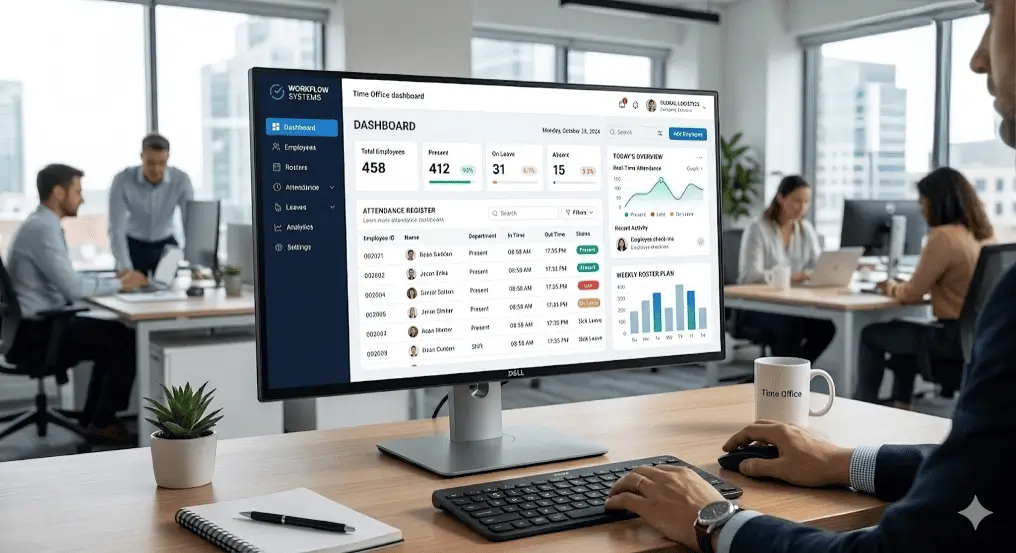
Workforce management and time office software – all modules in one view
What is workforce management software?
Workforce management (WFM) software is a category of tooling that plans, tracks and optimizes people at work. It forecasts demand, builds shift schedules, captures time and attendance, manages leave, enforces overtime and fatigue rules, and reports productivity and labor cost so managers staff the right hours at the right price.
Best For
In This Complete Guide
By the end of this guide, you'll learn:
- What workforce management software actually does
- How demand forecasting drives your schedule
- Shift scheduling and coverage planning
- Time & attendance capture done right
- Leave, overtime and fatigue rules that keep you compliant
- Productivity analytics that move the needle
- How WFM fits with HRMS and payroll
- How to evaluate and buy a WFM tool
- Frequently asked questions
Table of Contents
What is workforce management software?
Workforce management is the discipline of putting the right people to work at the right time, for the right hours, at the right cost. The software automates that discipline.
Where an HRMS answers "who works here and what do we pay them", a WFM answers "who should be working right now, is that enough, and is it costing what we planned". If your team lives on shifts, rosters, seasonality or a 24x7 calendar, you already live inside WFM territory whether or not you have the tool.
In India, the term covers a wide range: from a simple time office that prints a punch report, to an enterprise suite that forecasts a contact centre's call volume to the half hour. The sweet spot for most companies is a system that combines time office software, shift scheduling and attendance with payroll-grade records.
Forecasting: matching staff to actual demand
Before a schedule can exist, someone must answer "how much work is coming and when". That is forecasting, the most underrated part of WFM.
Retail sees weekends spike. A warehouse runs hard at month end. A call centre's queue swells at 10am and after lunch. A factory plans for the festival order surge. A WFM looks at history, seasonality and forward indicators, then projects how many people are needed by shift, day or hour.
Forecasting is where companies either save or burn money. Over-staff a shift and you carry idle wages; under-staff and you break service or miss the dispatch deadline. A good tool makes the demand number visible so scheduling decisions stop being a guess.
Reality check: You do not need an AI brain to start. Even a simple forecast built on last year's volumes, adjusted for day of the week, beats "ask the supervisor what feels right" every single month.
Shift scheduling and coverage planning
Forecast says 14 people on the night shift of the 12th. The scheduler then translates that into named people with start and end times.
A WFM scheduler assigns shifts while respecting constraints your rules define: who is trained for the role, who is already on 60 hours, who has a valid medical certificate, who cannot be back-to-back night. It flags conflicts instead of letting them become tomorrow's fire.
Employees see their schedule in advance through attendance management and self-service views, request swaps, and the manager approves in a few taps. Roster shock disappears, and coverage stays visible on one screen.
Time and attendance that feeds payroll cleanly
Everything downstream depends on accurate, capture-proof attendance. This is the core engine of any WFM.
Biometric machines, face devices, mobile geofence or web punch — the WFM takes whatever punch your team actually uses and turns it into scheduled hours, overtime, late/early marks and pay hours. It closes night-shift punches to the right day and applies grace and break rules automatically.
Multi-device capture
Biometric, face, app and web punches converge into one attendance ledger.
Night cross-day close
A 6am punch belongs to last night's shift, not this morning's log.
Grace & break rules
Late grace, lunch windows and shift tolerance applied automatically.
Pay-grade hours
Hours flow to payroll in normal, OT and night-slab buckets.
Leave, overtime and fatigue rules
Workforce management lives and dies by its rules. Leave that is not deducted from balance, overtime that is not capped, fatigue that is never noticed.
Leave policies hook into the same calendar as the roster, so an approved leave removes the person from the schedule and blocks double-booking. Overtime is computed from scheduled vs actual hours and can be capped per person, per month, protecting both the employee and the compliance posture.
Fatigue rules matter most in safety-critical work. If your industry caps consecutive night shifts or mandates a minimum rest between shifts, the WFM enforces it before the schedule is even published rather than after a problem emerges.
Productivity analytics that actually move the needle
Attendance reports tell you who was present. Productivity analytics tell you what the presence produced.
- Labor cost per unit produced or per order shipped.
- Overtime ratio and where it is concentrated.
- Absenteeism by shift, department and day of week.
- Occupancy vs demand forecast to expose over or under staffing.
- Cost per shift and headcount versus budget.
These numbers turn HR from a cost center into the source of the staffing answer. A plant head seeing "night shift ran 18% over plan last month" reacts differently than one reading "attendance was 92%".
WFM vs HRMS: what's the difference?
| Aspect | Workforce Management | HRMS |
|---|---|---|
| Primary focus | Who works when & for how long | Whole employee lifecycle |
| Forecasting | Core capability | Usually absent |
| Shift scheduling | Deep & rule-driven | Basic or integrated |
| Time & attendance | Engine room | Module within platform |
| Payroll | Feeds hours | Owns calculation & compliance |
| Recruitment, training | Out of scope | Included |
The cleanest setup for most Indian businesses is not two separate logins. It is an HRMS with WFM-grade workforce capabilities inside it, so scheduling, attendance, leave and payroll share one database.
Integrating WFM with HRMS and payroll
Where WFM and HRMS live separately, the handshake between "hours worked" and "salary paid" is where errors happen.
When they share a database, a schedule change updates the attendance expectation instantly, approved leave removes a person from the roster, and payroll pulls OT straight from the punch history. There is no "export from WFM, import to payroll, pray" weekend.
Integration tip: Whatever you buy, ask who owns the reconciliation. The vendor that can demo a schedule→attendance→payroll run in one flow will save your finance team the most pain.
How to evaluate workforce management software
Evaluate WFM the way you would staff it: with a real shift, a real overtime case and a real report.
Map your shifts & rules first
List every shift, grace, break and OT slab before you see a demo, so the demo can be judged against your reality.
Test a night-shift punch
Feed a 6:05am punch and confirm the system closes it to the correct night duty.
Run a real OT scenario
Confirm cap, multiplier and the payslip figure match your policy.
Ask for the coverage report
The report your ops head actually needs should render in under a minute.
Check the payroll handshake
Confirm hours flow to payroll without manual rework.
When you are ready to compare, talk to our workforce team and we will map your shift and OT structure inside the MegaMind platform before you decide.
Controlling labor cost per shift, per week, per unit
For most Indian employers, wages are the single biggest operating line. Workforce management software exists to make that line predictable, not just to record who came to work.
Labor cost is the product of three variables: how many people are on the clock, how many hours they work, and what those hours cost. A WFM gives you control over all three at once. Rosters cap the headcount, time and attendance captures the true hours, and payroll rules attach the correct rate including overtime multipliers and night shift allowances.
The most useful number a WFM produces is the cost per shift. Multiply the people scheduled by their planned hours and effective wage rates, and you can compare what a shift should have cost against what it actually cost when overtime, replacements and penalty rates are added. That single variance tells your plant head, store manager or warehouse supervisor exactly where money leaks.
Budget vs actual hours
Track planned hours against clocked hours so overspend is visible by shift before the month closes.
Overtime ratio
Overtime hours expressed as a percentage of total hours, trended by department and by manager.
Cost per unit
Connect attendance hours to production or orders so labor content per unit is clear to operations.
Cost per head
Compare average cost per employee across shifts, sites and skill bands to spot expensive staffing patterns.
Cost tip: Start with just one report, cost per shift, for one month. Once your team sees how much unplanned overtime and idle time actually costs, the business case for tighter scheduling writes itself.
Mobile apps and self-service for a field-based workforce
A workforce is no longer a row of people punching a machine at a front gate. Delivery riders, sales reps, site supervisors and field technicians spend their day away from the office, and a modern WFM has to manage them with the same rigor as a factory floor.
Mobile GPS attendance and geofencing are the answer for roaming employees. The employee opens the app within the defined radius of the site, marks attendance, and the punch is stamped with location and time. Riders check in at every delivery, technicians at every site, and sales staff at every customer meeting, giving you a verified attendance trail instead of a phone call from a supervisor.
Employee self-service goes far beyond punching in. Through the same app, staff view their roster for the coming week, request shift swaps, apply for leave, see their remaining leave balance and check how much overtime they have clocked. When people can see their own schedule and earnings, they stop chasing HR for basic answers, and managers stop being the middleman for every request.
Reality check: A mobile punch is only as trustworthy as the rule behind it. Require an approved shift for the punch to count, apply geo-fencing sensibly, and use face or PIN verification on the device so one employee cannot mark attendance for another.
For hybrid teams that split time between office, home and client sites, the same app becomes a single attendance record across all three. The office day is captured against the shift, the remote day against a work-from-home policy, and the client visit against a geo-verified task, all in one timeline that payroll can trust.
Workforce management and Indian statutory compliance
In India, the hours and attendance a WFM records are not just operational data, they are the evidence base for statutory dues, overtime obligations and audit questions.
The monthly payroll for a shift-based workforce is built on attendance-derived inputs. The hours an employee works decide the contribution bases and days counted for PF and ESI, the professional tax slab an employee falls into is tied to gross monthly earnings, and TDS is computed on the same earnings. If attendance is wrong, every downstream figure inherits the error. A WFM that feeds payroll cleanly is therefore a compliance tool as much as an efficiency tool.
Overtime is where most companies stumble. Indian labor law limits working hours for most establishments, and overtime above prescribed limits must be paid at prescribed rates, typically twice the ordinary rate. A WFM enforces these caps automatically, flags any scheduled shift that would breach the daily or weekly maximum, and keeps an auditable log of every exception.
| Statute / Dues | How WFM Helps |
|---|---|
| PF (Provident Fund) | Accurate working days and earnings feed correct contribution bases and monthly returns. |
| ESI (Employees' State Insurance) | Correct attendance days keep wages and contribution figures consistent with payroll. |
| Professional Tax (PT) | Verified gross pay per month determines the correct slab without manual guesswork. |
| TDS | Attendance-linked earnings flow into the salary engine so TDS is computed on the right base. |
| Overtime & weekly rest | Caps on hours, rest intervals and maximum weekly work enforced before the roster publishes. |
| Gratuity & leave | Continuous service records and leave balances stay accurate for entitlement calculation. |
Compliance tip: For factories, contact centres and logistics firms across Delhi, Noida and the NCR, keep at least the last three years of attendance and OT records exportable. When an inspector or auditor asks for evidence, a clean digital log beats a stack of registers every time.
Who should own workforce management in your company
Software is only as good as the person who owns the rules. Before you buy a WFM, decide who holds the pen on shifts, approvals and overtime, because that ownership decides whether the system is used or bypassed.
In most Indian organizations the split looks like this: operations owns the schedule because operations understands demand, HR owns the policy because HR understands leave and compliance, and finance owns the cost because finance understands the payroll impact. A WFM formalizes that split with role-based access, so each person changes only what they are accountable for, and every change is logged.
- Operations and shift in-charges build and publish rosters against the forecast.
- HR defines leave policy, overtime caps and fatigue rules that scheduling must respect.
- Finance monitors cost per shift and reviews overtime ratios before month-end.
- Employees and first-line managers handle swaps, approvals and self-service requests.
- A single WFM administrator owns master data, shift definitions and audit access.
The biggest governance mistake is letting every supervisor change rules on the fly. When OT caps can be edited at a terminal, you lose the control that justified the software. Keep rule changes as an HR or admin action, and give supervisors the ability to manage people, not the rulebook.
Reality check: If you run multiple sites, standardize the rule template first. A unit in Noida and a unit in Bangalore should share the same shift library and OT policy, with site-level exceptions only where the law or union agreement genuinely differs.
Common workforce management mistakes to avoid
Most WFM projects do not fail because the software is weak. They fail because of decisions made before and during implementation. Here are the patterns we see most often in Indian businesses.
1. Buying before mapping your shifts
If you cannot write down every shift, grace period, break and OT slab on one page, no software can guess them for you. Do the mapping first, then evaluate.
2. Letting supervisors keep parallel registers
The moment someone runs a WhatsApp log alongside the system, the system stops being the truth. Enforce single-source capture from day one, even if it hurts for a month.
3. Treating the punch as the only data
Attendance is a by-product of good scheduling. A WFM that only records punches is a time clock with a fancy report, not a workforce management system.
4. Ignoring night-shift closing rules
A 5am punch that lands on the wrong day distorts OT and wages for the whole cycle. Test cross-day closing before go-live, not after the first wrong payslip.
5. Skipping the parallel run
Run the old way and the new way side by side for at least one full month. Reconcile every variance before you switch off the register.
6. Under-resourcing rule maintenance
Shifts change with seasons and contracts. Budget someone to review and update rules monthly, or the system quietly drifts out of date.
Pro tip: Pick one pilot location, run it perfectly for two months, and use the results to win over every other branch. A successful pilot spreads faster than any memo.
A step-by-step WFM implementation plan
Workforce management rollouts succeed when they are planned in stages rather than switched on everywhere at once. This roadmap works for a single branch or a pan-India network.
Audit current shifts and rules
Document every shift, grace, break, OT slab and leave policy in one document before touching software.
Build the rule template
Configure shifts, holidays, overtime caps and fatigue rules in the system with HR and finance sign-off.
Connect devices and clean data
Pair biometric and face machines, load employee master data and reconcile opening leave balances.
Pilot one unit for a full cycle
Run one location through a complete payroll cycle and compare every figure against the old method.
Train in layers
Administrators first, then supervisors and shift in-charges, then employees on the mobile app.
Roll out site by site
Expand to the next branch or plant only after the previous one is stable, and keep a support window open.
Good to know: A phased rollout is especially important for multi-site employers in Delhi, Noida, Gurgaon and the wider NCR, where each site may have different device hardware and contract-workforce rules. Standardize the template centrally, then adapt site by site.
Workforce management for Delhi, Noida, NCR and pan-India operations
Where your workforce sits changes how you should configure your WFM. Delhi NCR businesses face a particular mix of challenges, and the same system has to flex as they expand across the country.
In Delhi, Noida and Gurgaon, you often run the same company across multiple jurisdictions with different professional tax rules, and your staff commute from across the NCR. Attendance policies have to tolerate genuine traffic delays, geofencing for field teams has to cover satellite towns, and PT slabs may need to be computed location by location. A WFM that applies rules per employee, per site, handles this without a single global override.
When operations expand from the NCR to pan-India, the system must scale without new manual processes. A warehouse in Haryana, a plant in Gujarat and a showroom in Tamil Nadu share the same rule library, but each gets its own holiday calendar, shift pattern and statutory configuration. Head office sees the consolidated view while each site manager sees only their own workforce.
Site-level rules
Separate holidays, shifts and PT rules per city without losing a central template.
Commute-friendly grace
Location-aware grace windows that reflect realistic travel across NCR satellite towns.
Multi-branch consolidation
One dashboard for head office, filtered views for every branch head in the network.
Audit-ready records
Exportable attendance and OT logs for any site, for any period, in minutes.
Local tip: When vendors quote you, ask specifically how their system handles per-city professional tax, multiple holiday calendars and site-level grace rules. In the NCR, those three details decide whether implementation is smooth or painful.
Frequently Asked Questions (FAQs)
1. What is workforce management software?
Workforce management (WFM) software plans, tracks and optimizes a team's work, forecasting demand, scheduling shifts, capturing time and attendance, managing leave and overtime rules and reporting productivity.
2. How is a WFM different from an HRMS?
An HRMS covers the employee lifecycle and payroll; a WFM focuses on who works when and at what cost. Modern platforms combine both.
3. What industries use workforce management software?
Manufacturing, retail, logistics, healthcare, contact centers, hospitality, BPO and BFSI, all of which run shift-based forecast-driven workforces.
4. What is workforce forecasting or planning?
Forecasting uses history, seasonality and volume signals to predict how many staff are needed per shift or hour so you schedule to real demand.
5. Does workforce management software include attendance?
Yes. Time and attendance is the core of most WFM, capturing punches and turning them into recorded hours for payroll and analysis.
6. Do you need a separate HRMS and WFM?
Not necessarily. Many platforms integrate WFM into an HRMS, giving scheduling plus payroll and compliance in one system.
7. Is workforce management only for large companies?
No. Small and mid businesses running shifts or seasonal demand benefit too, and cloud WFM scales with them.
8. What does workforce planning software track?
Staffing gaps, shift coverage, projected hours, overtime cost, absenteeism and headcount versus plan, guiding hiring and allocation.
9. Is attendance and overtime managed for compliance?
Yes. Good WFM applies overtime limits, tracks rests, flags fatigue and keeps auditable logs that support labour law compliance.
10. What analytics does WFM provide for productivity?
Labour productivity, hours per unit, occupancy, overtime ratio, absenteeism and cost per shift, turning HR data into operational decisions.
MindWave HRMS, Built by Megamind Technosoft
When you are ready to choose, start with the vendor who built the software behind this guide. The workforce management capabilities covered here run on a single cloud platform. Megamind Technosoft is an ISO 27001-certified HRMS and attendance software company in New Delhi, and its flagship product - MindWave HRMS - unites biometric and face attendance machines, mobile GPS attendance, leave, employee self-service (ESS) and payroll into one accurate, payroll-ready record built for Indian businesses, schools, hospitals and factories.
From a Delhi NCR office to pan-India rollout, our team handles biometric installation, face and fingerprint devices, mobile GPS apps and payroll statutory rules in one contract. You get a local partner who installs on-site in Delhi, Noida and NCR, plus India-time phone and WhatsApp support - not just a toll-free number.
- Company: Megamind Technosoft Solutions Pvt. Ltd.
- Product: MindWave HRMS - Attendance, Leave & Payroll
- Address: 3rd Floor, C-41, Pandav Nagar Complex, New Delhi - 110092, India
- Phone: +91-7982869398 | +91-9818442254
- Email: sales@megamindindia.in
- Website: www.megamindindia.in
- Timings: Mon - Sat, 9:30 AM - 6:30 PM IST